
A free alternative to FreeFileSync for folder backup
Backup by Zaweba is a free alternative to FreeFileSync for folder backup: Echo, Mirror and two-way sync with a preview, schedules and a dashboard.
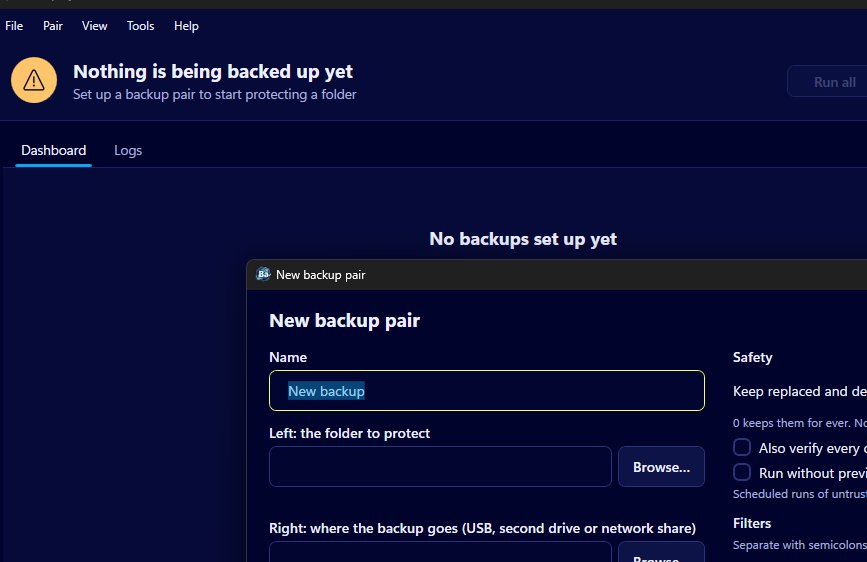
For another free way to back up folders, Backup by Zaweba is a good fit. Like FreeFileSync it copies between pairs of folders, with an add-only mode (Echo), a Mirror mode and two-way Synchronise, and it shows a preview of every step before anything changes. The difference is in approach: it's built around a dashboard of backup pairs with schedules and status, rather than a general folder comparison grid.
So it's a different shape of tool rather than a copy. Which one suits you depends on whether you mostly compare folders by hand or mostly want backups that run and report on themselves.
What FreeFileSync is
FreeFileSync is a well known, open source folder comparison and synchronisation program for Windows, macOS and Linux. You choose two folders, it compares them and shows the differences side by side, and you choose how to synchronise them. It's popular with people who like to see and adjust a comparison before each sync, and it has been around for many years.
Where Backup by Zaweba fits
Backup by Zaweba starts from the backup rather than the comparison. Each backup is a pair: a name, a folder to protect on the left, and a folder on a USB stick, second drive or network share on the right. Each pair has its own mode, schedule and filters, and appears as a card on the dashboard with a green tick, an amber exclamation mark or a red cross, the last run time, the next run and the drive it lives on.
The three modes cover the usual jobs. Echo, the default, copies new and changed files to the backup and never removes anything there. Mirror makes the backup match the source. Synchronise carries new, changed and deleted files both ways, using a saved record of the last run so it can tell a new file from one deleted on the other side.
The preview is where it comes closest to a comparison view. It lists every step with the reason for it, with counts and sizes for new files, updates, moves to the versions folder, files already the same and conflicts, and a filter to narrow the list.
Safety built into every run
Nothing is simply deleted or overwritten by a run. The old copy is first moved to a _zaweba_versions folder, in a dated subfolder, and kept for 30 days by default, or for ever if you set the pair to 0. A mass-removal guard stops any Mirror or Synchronise run that would move more than half the files (and at least 10) and makes you look at the preview, even on a schedule. A missing source folder stops the run rather than being treated as empty, and each copy is written under a temporary name and checked before it takes its real one.
Running on its own
Pairs can run daily, weekly, at login or when their drive is connected. Drives are found by volume ID, so a stick that comes back with a different letter is still recognised. Once you trust a pair you can let it run without the preview, and every run writes a log. For scripts there's a --run option on the command line, with exit codes to show how it went.
Choosing between them
If your work is mostly comparing two folders by eye and adjusting the result before each sync, FreeFileSync's comparison view is built for that and Backup by Zaweba isn't trying to replace it. If you want a handful of backups that run on schedule, keep old copies safe and tell you plainly when one needs attention, Backup by Zaweba does that job directly. It's free software under its EULA, works offline and needs no account, on Windows with a Mac and Linux version as well.

