
Clip by ZawebaCopy now, paste whenever you like.
Everything you copy, ready to paste again. Nothing leaves your PC. A private clipboard history in the tray: press Ctrl+Shift+V, type a few letters, press Enter. Pins, snippets and plain-text paste too.
This version isn't signed for Windows yet: if SmartScreen warns you, choose More info › Run anyway. Why?
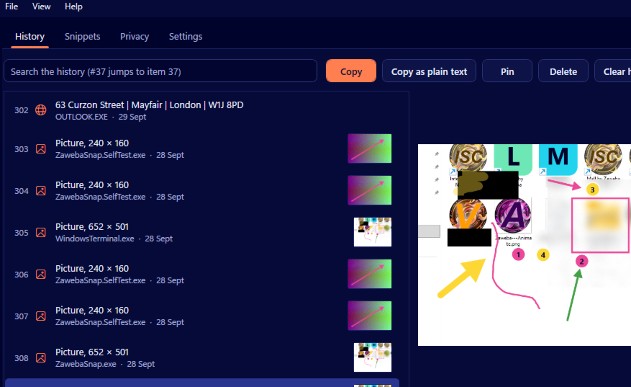
Clip by Zaweba sits in the notification area and remembers what you copy: text, formatted text, web content, pictures and lists of files. Press Ctrl+Shift+V and a list opens at the pointer. Type a few letters to filter it, or a number such as #37, press Enter, and it's pasted into the window you were using.
Pin your address and email signature so they're always at the top. Save snippets with short triggers or their own hotkeys. Passwords that password managers mark as private are never recorded, and the history stays on your PC in a local database you can encrypt. No account, no cloud.
Who it's for
- Writers and researchers juggling quotes and links
- Office workers who paste the same address ten times a day
- Support staff with stock replies
- Anyone who has lost something they copied a minute ago
Good to know
- Some programs use Ctrl+Shift+V for paste as plain text; while Clip runs it opens Clip instead, and you can change it in one click
- Passwords copied by browser-extension password managers can't be detected, so pause recording while you use one
- Can't paste into programs running as administrator; the item is left on the clipboard for Ctrl+V
Private by design
- Works offline, with no account and no adverts.
- Checks zaweba.com once a day for a newer version, sending only the app's name.
- Problem reports and feedback are sent only if you click Send.
Everything you need, nothing you don't.
Find it in a few keys
Type to filter by text or program, jump straight to #37, or paste rows 1 to 9 with Ctrl+1 to Ctrl+9.
Pins that stay put
Pinned items stay at the top in the order you pinned them, and no history limit ever removes them.
Snippets with triggers
Named text blocks with a trigger such as ;addr or their own global hotkey, for addresses, replies and signatures.
Paste as plain text
Shift+Enter pastes just the words, without the fonts, colours or links of the original.
Passwords skipped
Content that password managers flag as private is ignored before it's read, and common password managers are excluded by name.
Encrypt at rest
Optionally seal your history with Windows' own encryption for your user account. Deleted items are overwritten on disk.
Your clipboard, keyboard first
Press Ctrl+Shift+V wherever you are and the list opens at the pointer, pins first and then newest first, every row numbered. Type to narrow it down, Enter to paste. Recalling something you copied an hour ago takes a handful of key presses.
- Opens at the pointer, instantly
- Every word you type must match
- Pictures and file lists too
Private by design
Clip checks the privacy flags password managers set before it looks at anything, and skips programs on its excluded list. Pause recording with one click from the tray. Clear history keeps your pins, and Clear everything really does clear everything.
- Respects private flags from password managers
- Excluded apps list, ready filled
- Pause recording, remembered across restarts
The details
| Works on | Windows 10 and 11 (64-bit) |
|---|---|
| Records | Plain text, formatted text (RTF), web content (HTML), pictures and file lists |
| History | 500 items by default, up to 100,000, plus pins that are never removed |
| Stored in | A local SQLite database, with optional Windows DPAPI encryption |
| Hotkeys | Ctrl+Shift+V for the popup (changeable), plus your own for snippets |
| Version | Version 1.1.0 |
| Download | ZawebaClip-1.1.0.zip (67 MB): unzip and run, no installer |
| Licence | Free for everyone, with every feature included. No warranty |
Clip FAQ
Does Clip record my passwords?
Not from desktop password managers that mark them as private, or from the common ones on its excluded list. Passwords copied by a browser extension look like ordinary text, so pause recording while you use one.
Will my history survive a restart?
Yes. Everything is kept in a database file in your profile, and Clip can start when you sign in. Pinned items are never removed by the history limit.
Can snippets fill in the date or a name?
No, snippets are plain text. Type the trigger in the popup and press Enter, press Tab for the snippet list, or give a snippet its own hotkey.
Related apps

Snap
Capture a region, window or screen, add arrows, text, numbered steps and blur that really hides things, then copy or save. Lives in the tray.
Explore Snap
Read
Reads the text in scans, phone photos, screenshots and scanned PDFs on your PC, and saves it as text, .docx, searchable PDF or CSV.
Explore Read
Macro
Record clicks and keystrokes, edit them as plain English steps and replay at up to 10 times speed, in loops, from hotkeys or row by row from a CSV.
Explore Macro
Schedule
Programs, scripts, web addresses and Zaweba jobs on plain-English timetables or triggers, with a full history of every run and alerts on failure.
Explore Schedule
Try Clip today.
Download Clip by Zaweba: no account, no adverts, every feature included.