
Screensavers by ZawebaBring back the screensaver, and make your own.
Twenty original screensavers, and a simple way to make your own. Starfield warp, Aquarium, Deep space, Night motorway, a big clock, your photos and more, with live previews, plus screensavers made from your own web pages.
This version isn't signed for Windows yet: if SmartScreen warns you, choose More info › Run anyway. Why?
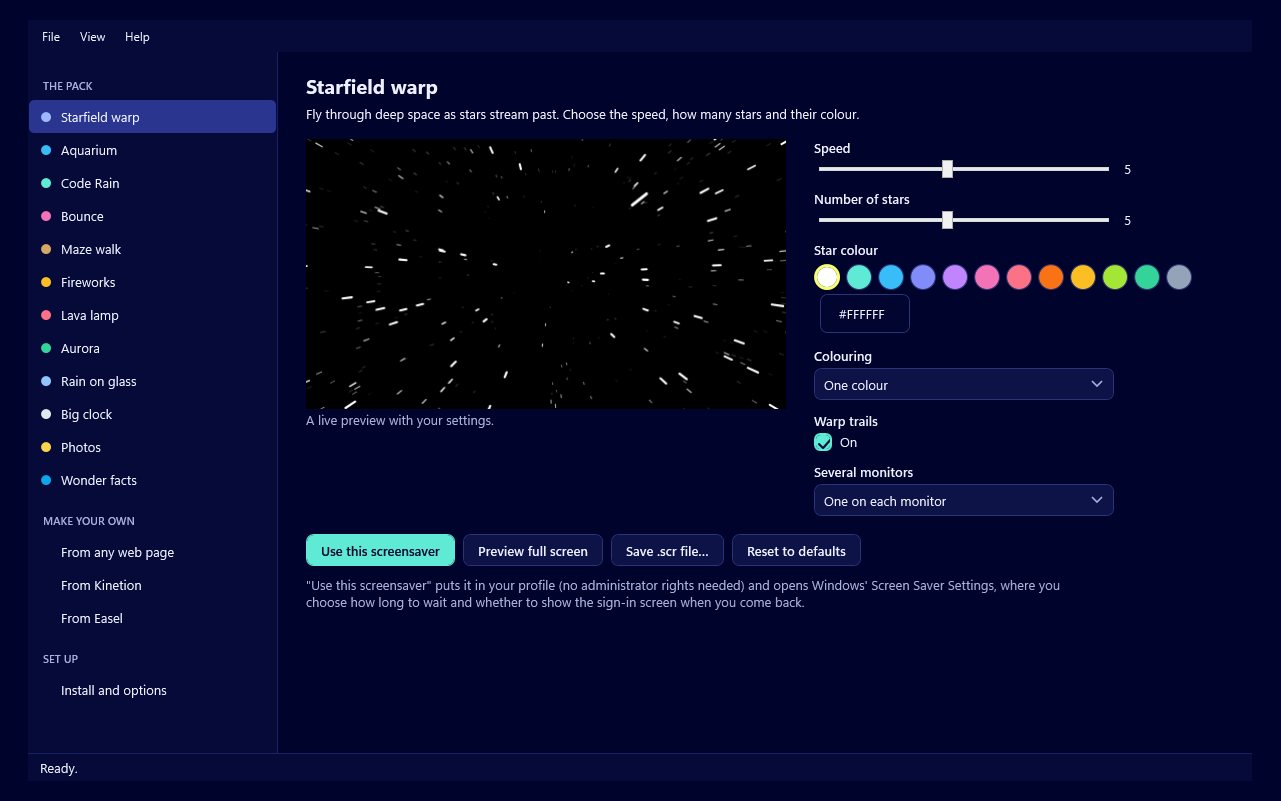
Screensavers by Zaweba brings back the joy of a good screensaver. Twenty originals, all drawn by our own code: Starfield warp, Aquarium, Code Rain, Bounce, Maze walk, Fireworks, Lava lamp, Aurora, Rain on glass, Big clock, Photos and Wonder facts, plus a night pack of dark scenes with a few bright moving things: Difference clouds, Deep space, Shuttle drift, Growing foliage, Poker deal, Stout pour, Night motorway and Animals in the dark. Each has its own settings and a live preview that follows them.
Make your own too. Turn any folder of web files into a screensaver, or export an animation from Anima by Zaweba straight to one. Choose one per monitor or one across them all, set a frame cap, and let the battery saver blank the screen when your laptop is running low.
Who it's for
- Anyone who misses the screensavers of old
- Families who want a clock or their photos on an idle screen
- Animators who want to see their work on the desktop
- Web makers who want to turn a page into a screensaver
Good to know
- Screensavers run on Microsoft Edge WebView2, which comes with Windows 11
- Wonder facts needs Wonder by Zaweba with an encyclopedia downloaded
- Installs to your own profile; no administrator rights needed
Private by design
- Works offline, with no account and no adverts.
- Checks zaweba.com once a day for a newer version, sending only the app's name.
- Problem reports and feedback are sent only if you click Send.
Everything you need, nothing you don't.
Twenty originals
From a warp through the stars to an aquarium of made-up fish, a first-person maze walk and rain running down glass.
Live previews
See each screensaver in the manager as you change its settings, then preview it full screen.
Several monitors
One on each monitor, one spanning them all, or the main monitor only with the others black.
Your photos
Show photos from your Pictures or folders you choose, with pan and zoom, or only Disk Sort favourites.
Make your own
Turn any folder with an index.html into a screensaver, or export one from an Anima by Zaweba animation.
A night pack
Turning galaxies, a foggy motorway at night, cards dealt on felt and a stout that pours and settles, all dark and easy on the eye.
A screensaver for every mood
Big clock drifts slowly round the screen, flip or analogue, so it's kind to OLED screens. Bounce shows your own words or logo and throws confetti when it hits a corner exactly. Wonder facts shows random articles from Wonder by Zaweba. Everything is original, with descriptive names.
- Eight new night-time screensavers
- Install several and get one at random
- A 30 or 60 fps cap and a battery saver
Your animation as a screensaver
In Anima by Zaweba, File > Export as Screensaver builds your animation into a screensaver and installs it. Or choose any folder with an index.html, give it a name and press Build and use. Screensavers run offline, using only their own files, and close the moment you touch the mouse.
- Opens Windows' Screen Saver Settings for you
- Save a .scr file to share
- Installs to your profile, no admin rights needed
The details
| Works on | Windows 10 and 11 (64-bit) |
|---|---|
| Makes | .scr screensaver files |
| Your own from | Any folder with an index.html, or Anima by Zaweba animations |
| Monitors | One per monitor, spanning, or main monitor only |
| Version | Version 1.2.2 |
| Download | ZawebaScreensavers-1.2.2.zip (67 MB): unzip and run, no installer |
| Licence | Free for everyone, with every feature included. No warranty |
Screensavers FAQ
How do I set one as my screensaver?
Choose it in the manager and press Use this screensaver. It installs to your profile and opens Windows' Screen Saver Settings.
Can I have more than one?
Yes. Install several builds the ones you tick into one screensaver that picks one of them at random each time.
Will it slow my PC down?
No. Even the heaviest screensaver used under 2% of a mid-range PC's processor in our tests, and the frame cap keeps it light.
Related apps

Anima
Timeline, keyframes, shape and motion tweens, symbols and simple actions, then publish a small player that runs on any website.
Explore Anima
Wonder
Download Wikipedia once, then read offline with Surprise me, random rabbit holes, Five a day and On this day, in a clean reading view.
Explore Wonder
Disk Sort
A disk space analyser and photo sorter in one window: treemaps, duplicates and cleanup beside keepers, stars, tags and safe file moves.
Explore Disk Sort
Easel
A painting studio where every tool behaves like the real thing: watercolours run and bloom, oils stay wet and pencils catch the paper's grain.
Explore Easel
Try Screensavers today.
Download Screensavers by Zaweba: no account, no adverts, every feature included.