
Write by ZawebaLetters, CVs and reports, on real pages.
A proper word processor, with .docx built in. A simple, offline word processor with real pages, styles, tables and spell check. It saves .docx, so your files open anywhere.
This version isn't signed for Windows yet: if SmartScreen warns you, choose More info › Run anyway. Why?
The Mac app isn't notarised by Apple yet: the first time, open it, then go to System Settings › Privacy & Security and choose Open Anyway. On Linux, make the AppImage executable (right-click › Properties, or chmod +x) and run it, or install the .deb.

Write by Zaweba is a word processor for letters, CVs, notes, reports and school work. It has real pages with headers, footers, page numbers and footnotes, styles and a headings pane, and tables and pictures that sit neatly with the text.
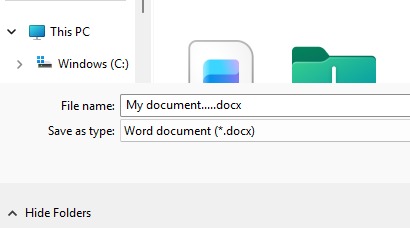
Its own format is .zawr, which is a .docx inside: rename it, or choose Save As .docx, and it opens in almost any word processor. It also opens and saves .docx, .odt, .rtf, Markdown and plain text, keeps the parts of .docx files it can't edit, and tells you before a save would lose anything. There is no ribbon, no account and no cloud.
Who it's for
- Anyone who wants a simple word processor with proper pages
- Students writing essays and school work
- Job hunters putting together a CV and covering letter
- Clubs and small offices writing to a mailing list
Good to know
- UK English spelling is included; other dictionaries download only when you choose a language
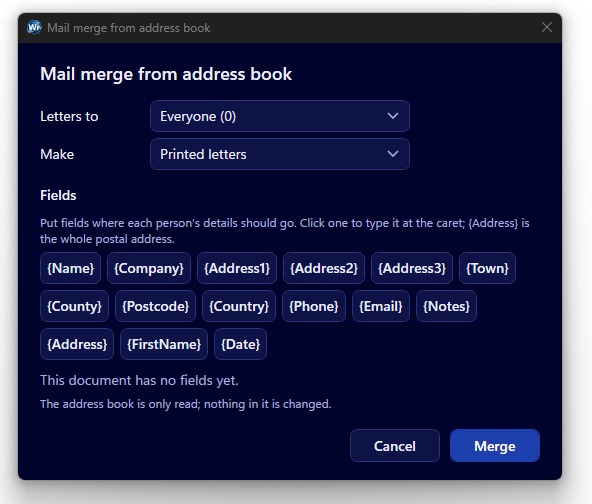
- Mail merge uses the address book from Labels by Zaweba
- Right-to-left scripts and hyphenation aren't supported
Private by design
- Works offline, with no account and no adverts.
- Checks zaweba.com once a day for a newer version, sending only the app's name.
- Problem reports and feedback are sent only if you click Send.
Everything you need, nothing you don't.
Real pages, as printed
Headers, footers, page numbers, footnotes and sections, laid out on the page exactly as they will print and export to PDF.
Styles and headings
Title, headings, quotes and your own styles. Headings fill a navigation pane so you can jump round long documents.
Tables and pictures
Merge cells, add borders and shading, repeat header rows. Pictures sit inline or wrap square, tight or top and bottom.
UK spell check
Red squiggles as you type, with suggestions on right-click. US English, French, German, Welsh and more download when you pick them.
Autosave and recovery
A copy is saved every minute while you work. If the PC crashes, Write offers to bring your document back.
Focus mode
Press F11 for full screen with just the pages and typewriter scrolling, so nothing gets between you and the words.
.docx files, kept intact
Write's own .zawr files are .docx inside, and it opens and saves .docx directly, so there is nothing to convert. A .docx made in another word processor opens and looks the same, and saves back as .docx. Tracked changes, comments, charts and other things Write can't edit are kept and written back untouched, and saving to a simpler format lists exactly what would be lost first.
- Opens and saves .zawr, .docx, .odt, .rtf, .md and .txt
- Exports PDF and a single-file HTML page
- Warns before any save that would lose something
Letters for everyone on your list
Write reads the address book from Labels by Zaweba. Pick a group, put fields such as {Name} and {Address} in your letter, and Write makes one letter per contact as a merged .docx, a PDF or straight to the printer. Or start from a template: UK letter, CV, report, meeting notes, fax cover sheet or DL envelope.
- Mail merge from a Labels group
- Merge to .docx, PDF or the printer
- Six ready-made templates
Quick on any PC
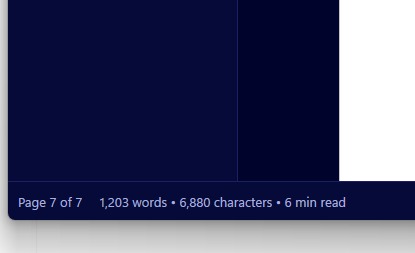
Write is ready to type in under two seconds from a cold start. A hundred-page document scrolls and edits without lag, because only the paragraph you are typing in is measured again. Word count, character count and reading time sit in the status bar as you go.
- Ready to type in under 2 seconds
- Smooth with 100-page documents
- Word count and reading time as you type
The details
| Works on | Windows 10 and 11 (64-bit), macOS 12 or later (Apple silicon and Intel), Linux (64-bit, x86 and ARM) |
|---|---|
| Opens | .docx, OpenDocument (.odt), Rich Text (.rtf), Markdown (.md) and plain text (.txt) |
| Saves | The same formats, with its own .zawr (a .docx inside) as standard |
| Own file type | .zawr, opened by Write when you double-click it |
| Exports | PDF (fonts embedded, real text) and single-file HTML |
| Spelling | UK English included; US, Australian and Canadian English, French, German, Spanish, Italian, Dutch, Portuguese and Welsh to download |
| Page sizes | A4, A5, Letter, Legal, envelopes and custom, portrait or landscape |
| Version | Version 1.3.2 |
| Download | ZawebaWrite-1.3.2.zip (70 MB): unzip and run, no installer |
| Licence | Free for everyone, with every feature included. No warranty |
Write FAQ
Will my .docx documents look the same?
Very nearly. In tests, words landed within a couple of points of where the original program put them. Write doesn't apply kerning, so now and then a line breaks one word differently.
What happens to things Write can't edit, like tracked changes?
They are kept. Tracked changes show as coloured text, comments and content controls are preserved, and charts show as placeholders. Saving back to .docx writes them out unchanged.
Does it open .rtf and .txt files?
Yes. Write opens .rtf and .txt files and adds real pages, tables, spell check and .docx.
Related apps

Labels
Keep contacts in groups, then print address labels, envelopes and badges onto Avery sheets, thermal rolls or PDF, lined up exactly.
Explore Labels
Publish
Lay out flyers, newsletters, posters, menus and cards with linked text and wrapping pictures, then export print-ready PDFs.
Explore Publish
A fast, offline PDF viewer that opens huge files in a blink, with tabs, quick search and thumbnails, lets you change the text in your PDFs, and prints them just how you want.
Explore PDF
Read
Reads the text in scans, phone photos, screenshots and scanned PDFs on your PC, and saves it as text, .docx, searchable PDF or CSV.
Explore Read
Try Write today.
Download Write by Zaweba: no account, no adverts, every feature included.