
Video by ZawebaEdit, caption and export without leaving your PC.
A solid video editor that turns short AI clips into finished episodes. A multi-track video editor with titles, transitions and auto-ducking, plus an Episode Builder that turns a script and AI clips into a finished episode.
This version isn't signed for Windows yet: if SmartScreen warns you, choose More info › Run anyway. Why?
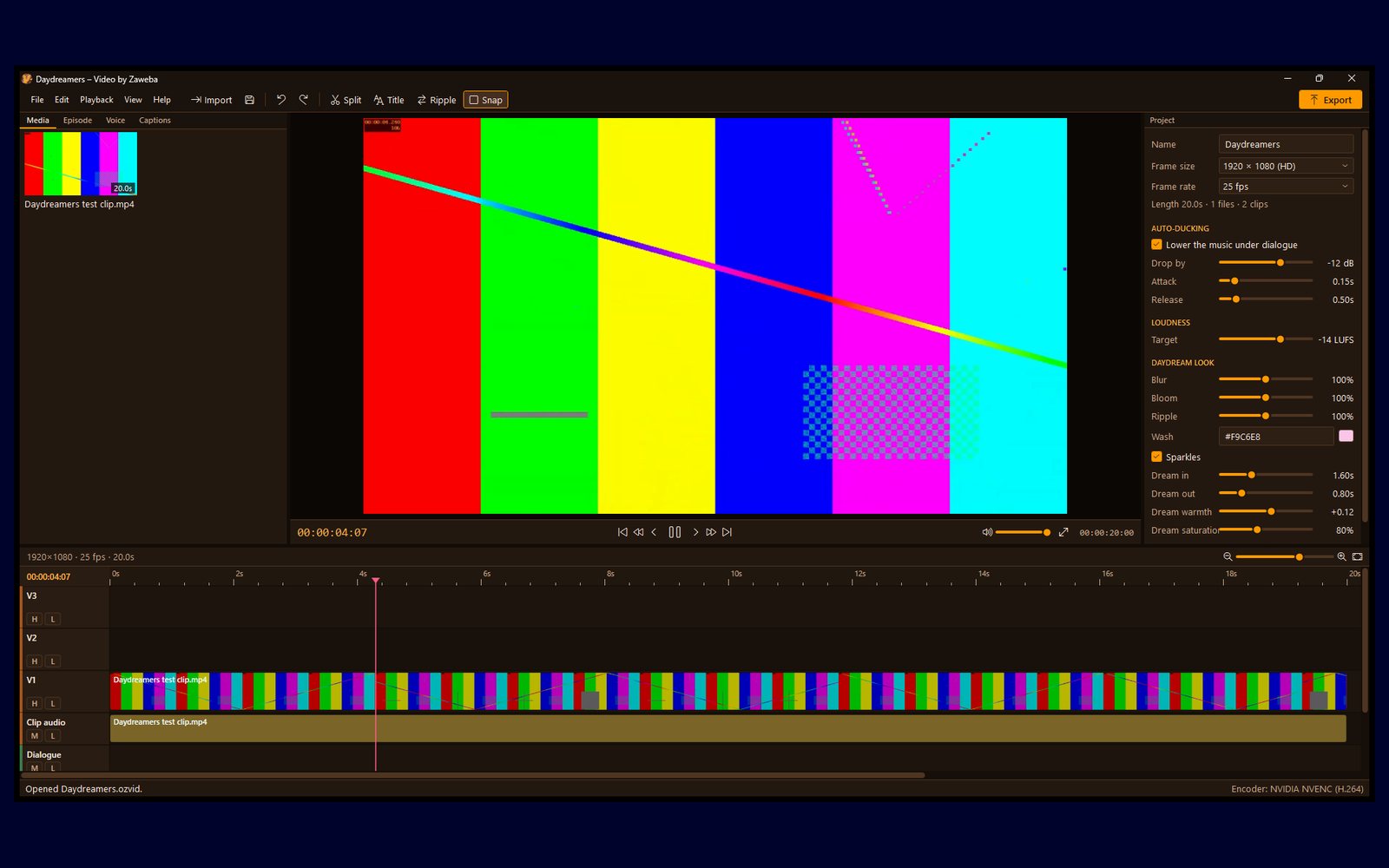
Video by Zaweba is a simple, solid video editor. Bring in clips, music and pictures, lay them on a multi-track timeline, then trim, split and ripple delete. Add transitions, animated titles and a colour grade, and let the music duck under speech by itself. What you see in the preview is exactly what you export.
It also has an Episode Builder for people making series from short AI-generated clips. Paste in your script, point it at your clips folder, and it builds a shot list, matches takes to shots and assembles the episode in one click. Record the voiceover, add captions timed to the speech and export the lot, ready to upload.
Who it's for
- Creators making series from short AI-generated clips
- YouTubers who want clean sound and captions without a subscription
- Families and schools putting together holiday or project videos
- Anyone who wants a straightforward editor that works offline
Good to know
- Uses your graphics card's video encoder when it can, with a software fallback
- Captions are recognised in English
- Includes FFmpeg and a speech model, so the download is large
Private by design
- Works offline, with no account and no adverts.
- Checks zaweba.com once a day for a newer version, sending only the app's name.
- Problem reports and feedback are sent only if you click Send.
Everything you need, nothing you don't.
Multi-track timeline
Trim, split, ripple delete, link and unlink, freeze frames and markers, with undo that covers every edit.
Titles and transitions
Animated titles that fade, slide, pop or type themselves out, plus dissolves, fades, wipes, slides and zooms.
Sound that sorts itself out
Music dips under dialogue automatically, with noise reduction, voice EQ and exports levelled to -14 LUFS.
Captions from speech
Captions are made on your PC from the dialogue, spelled from your script when you have one, then exported as .srt or burned in.
Fast exports
Uses your graphics card's video encoder when it has one, with a render queue that works through jobs one after another.
Autosave and recovery
Your project is saved every minute and offered back after a crash. Moved media can be relinked from a folder.
From script to episode in one click
Paste in a script with numbered shots and voice lines, point the Episode Builder at your folder of clips, and it matches files to shots by name, keeps every take, and assembles the episode on the timeline. Flick between takes with the square bracket keys and star the ones you like.
- Reads scripts as .txt, .md or .docx
- Watches a folder and adds downloads as they finish
- Colour match evens out drift between generations
Voiceover and captions built in
Record each voice line straight onto the timeline, take after take, or drop in recordings named by shot and line. Captions are worked out from the speech on your PC and lined up with your script, so names are always spelled as written, then styled, exported as .srt or burned into the picture.
- Voice takes saved beside your project
- Captions kept to two short lines
- A series template keeps intro, outro and styles the same
The details
| Works on | Windows 10 and 11 (64-bit) |
|---|---|
| Opens | MP4, MOV, MKV, WebM, AVI, WMV, MTS, MPG and 3GP video; WAV, MP3, M4A, FLAC, OGG and more; PNG, JPEG, GIF, WebP and TIFF |
| Exports | MP4 (H.264 or H.265) with presets for 1080p, 4K, vertical 9:16 and square 1:1 |
| Captions | SubRip (.srt) or burned into the picture |
| Projects | .ozvid project files and .ozvtpl series templates |
| Version | Version 0.5.2 |
| Download | ZawebaVideo-0.5.2.zip (563 MB): unzip and run, no installer |
| Licence | Free for everyone, with every feature included. No warranty |
Video FAQ
Do my videos get uploaded anywhere?
No. Editing, captions and exports all happen on your PC. Your original files are only ever read, never changed.
Do I need AI clips to use it?
Not at all. The Episode Builder is there if you want it, but Video is a complete everyday editor for any footage, music and pictures.
Will it run on my laptop?
Video edits from small proxy copies it makes in the background, so the preview stays smooth, and exports use your graphics card when they can.
Related apps

Cut
Frame-exact trims, lossless cuts, joins, filters and converting with presets such as For WhatsApp and For email, quick even on low-spec PCs.
Explore Cut
Loop
Drag loops onto a grid and they follow your song's tempo and key. Then grow into a studio with a piano roll, instruments, recording and effects.
Explore Loop
Play
A music player with real character: instant library search, gapless playback, a 10-band equaliser, 557 music-reactive visualisations, a compact bar and audio CDs.
Explore Play
Mix
A two-deck DJ mixer for your own music: beat sync, key lock, EQ, loops, effects, recording and What next suggestions with reasons.
Explore Mix
Try Video today.
Download Video by Zaweba: no account, no adverts, every feature included.