
Disk Sort by ZawebaYour whole drive, mapped and sorted.
Find where your space went, then sort what you find. A disk space analyser and photo sorter in one window: treemaps, duplicates and cleanup beside keepers, stars, tags and safe file moves.
This version isn't signed for Windows yet: if SmartScreen warns you, choose More info › Run anyway. Why?
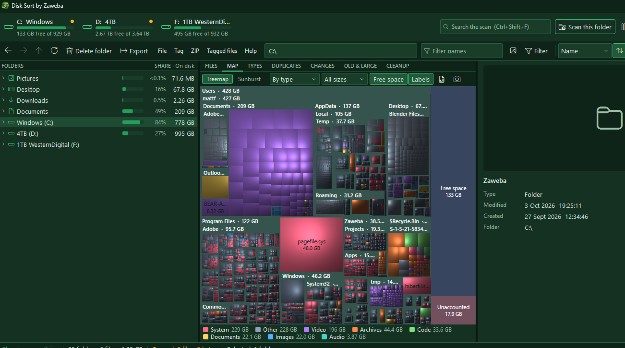
Disk Sort by Zaweba is a disk space analyser and a photo and file sorter in one offline app. A keyboard-friendly folder tree shows a size bar beside every scanned folder, and the map turns your drive into a treemap or sunburst, so the folders eating your space stand out at once.
When you find them, deal with them in the same window. Flick through photos, star the keepers and send the rest to the Recycle Bin, tag files across folders and act on them all at once, or copy, move, rename and zip. Duplicates, old and large files and cleanup suggestions are a tab away.
Who it's for
- Anyone whose drive is suddenly, mysteriously full
- Photographers culling a big shoot down to the keepers
- People tidying years of phone photos and downloads
- Keyboard fans who like a fast, two-pane file manager
Good to know
- Fast scanning and live updates need administrator rights; the standard scan doesn't
- Burn with Burn appears in the menus when Burn by Zaweba is installed
Private by design
- Works offline, with no account and no adverts.
- Checks zaweba.com once a day for a newer version, sending only the app's name.
- Problem reports and feedback are sent only if you click Send.
Everything you need, nothing you don't.
Treemap and sunburst
See every scanned folder as a treemap or a sunburst and dive in with a double-click.
Duplicates and old files
Find duplicate files, old and large files and a breakdown by file type, then act on the results like any other files.
Keepers and stars
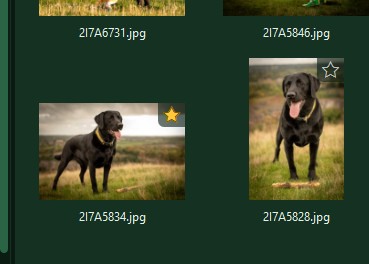
Star the photos worth keeping, rate them 1 to 5, then delete all but the keepers in one confirmed step.
Tag across folders
Tag files anywhere on the drive, then copy, move, zip or burn them together.
See what changed
Compare a scan with an earlier snapshot to see which folders have grown since last time.
Safe by design
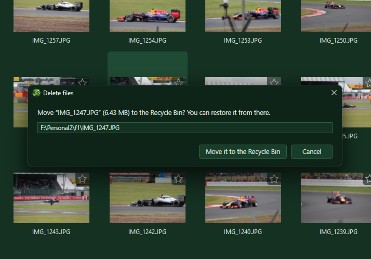
Deletes go to the Recycle Bin, system folders are protected and every delete, move or overwrite asks first.
From full drive to tidy folders
Spot a huge photo folder in the map, open it and flick through the pictures full size. The zoom stays put as you move between shots, so comparing sharpness is easy. Star the keepers, then send every other picture in the list to the Recycle Bin in one confirmed step.
- Treemap or sunburst of every scan
- Keepers marked with a star or P
- Delete all but keepers, after confirming
Careful with every file
Disk Sort never deletes anything permanently. Drives without a Recycle Bin are refused rather than wiped, Windows and Program Files are protected, and every copy, move or delete shows counts and a preview first. Moving to another drive checks that everything arrived before the original goes.
- Recycle Bin only, never permanent
- Protected system folders and drive roots
- Originals never modified
Fast scans, live updates
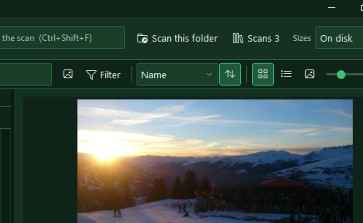
On a local NTFS drive, Disk Sort can read the drive's own index directly for a much faster scan, then keep up with changes as they happen. That needs administrator rights, and Restart as admin reopens the app on the same folder. Without them, the standard scan works on any drive.
- Fast index scan as administrator
- Live updates while you work
- Standard scan works everywhere
The details
| Works on | Windows 10 and 11 (64-bit) |
|---|---|
| Photos | JPG, PNG, WebP, HEIC, GIF, BMP and TIFF |
| Archives | Opens ZIP, 7z, RAR and TAR as folders; makes ZIP files |
| Views | Files, treemap, sunburst, file types, duplicates, changes, old and large, cleanup |
| Version | Version 0.2.6 |
| Download | ZawebaSort-0.2.6.zip (67 MB): unzip and run, no installer |
| Licence | Free for everyone, with every feature included. No warranty |
Disk Sort FAQ
Could it delete something I didn't mean to?
Everything it deletes goes to the Recycle Bin, and it asks first with counts and a preview. Windows, Program Files and drive roots are blocked, and drives without a Recycle Bin are refused.
Why does it offer to restart as administrator?
Only for the fast scan and live updates, which read the drive's own index. Without administrator rights the standard scan still works on any drive, just more slowly.
Can I look inside ZIP files?
Yes. ZIP, 7z, RAR and TAR archives open like folders in the tree. A file you open from inside one is copied, read-only, to a temporary folder first.
Related apps

Burn
Burn data, audio CDs and ISO images to disc, read data discs to ISO, build ISOs from folders, convert old image formats and mount them in one click.
Explore Burn
Family
People, relationships, events, sources and photos in five views, with GEDCOM 5.5.1 and 7.0 in and out, and charts that print beautifully.
Explore Family
Screensavers
Starfield warp, Aquarium, Deep space, Night motorway, a big clock, your photos and more, with live previews, plus screensavers made from your own web pages.
Explore Screensavers
Paint
Layers, masks, live layer effects, a brush engine that feels like paint and one-click background removal, all offline on your own PC.
Explore Paint
Try Disk Sort today.
Download Disk Sort by Zaweba: no account, no adverts, every feature included.