
Colour by ZawebaSee a colour you like? Pick it straight off the screen.
Point at any pixel on screen and get its colour in every format. Press Ctrl+Alt+C anywhere, zoom in with the magnifier and click a pixel. HEX, RGB, HSL, CMYK and more, each one click to copy.
This version isn't signed for Windows yet: if SmartScreen warns you, choose More info › Run anyway. Why?
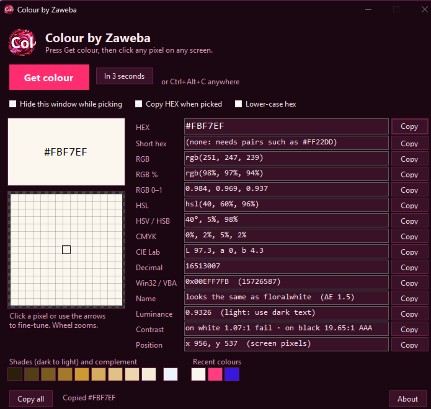
Colour by Zaweba picks colours from anywhere on your screen. Press Get colour, or Ctrl+Alt+C from any program, and the whole desktop is frozen across every monitor while a magnifier follows the pointer. Zoom in, nudge one pixel at a time with the arrow keys, and click to pick.
The colour is shown as HEX, RGB, HSL, HSV, CMYK, CIE Lab and more, each with its own Copy button, along with the nearest CSS colour name and how well it reads on white and on black. It's one small file with nothing to install, and it never uses the network.
Who it's for
- Web designers and developers matching a colour
- Artists borrowing colours from a reference picture
- Anyone checking that text is readable on its background
- People making slides and documents in house colours
Good to know
- Because the screen is frozen when you start, hover effects and menus need In 3 seconds so they're open before the picture is taken
- Your settings and recent colours are kept in a small text file in your profile
Private by design
- Works offline, with no account and no adverts.
- Checks zaweba.com once a day for a newer version, sending only the app's name.
- Problem reports and feedback are sent only if you click Send.
Everything you need, nothing you don't.
Magnifier that holds still
The screen is frozen while you pick, so you can zoom from 3x to 32x and nothing moves under the pointer.
Hotkey from anywhere
Ctrl+Alt+C starts a pick from any program, or use In 3 seconds to open a menu or hover over something first.
Every format, one click
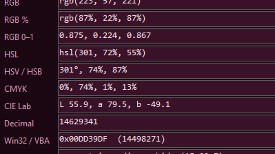
HEX, RGB, RGB %, HSL, HSV, CMYK, CIE Lab, decimal and Win32 COLORREF, each with Copy, plus Copy all.
Nearest CSS name
Finds the closest of the 148 CSS colour names and says how close it is.
Contrast check
Luminance and the WCAG contrast ratio and grade against white and black, for readable text.
Shades and recent colours
Shades from dark to light, the complementary colour and your last 12 picks, each a click away.
Pixel-perfect picks
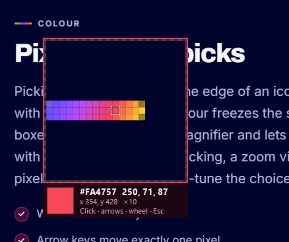
Picking a one-pixel line or the edge of an icon is fiddly with a plain eyedropper. Colour freezes the screen, boxes the exact pixel in a magnifier and lets you step with the arrow keys. After picking, a zoom view of the pixels around it lets you fine-tune the choice.
- Works across every monitor
- Arrow keys move exactly one pixel
- Real pixels on high-DPI screens
Every value you need
The main window lists the colour in every common format, so you can paste it into CSS, a design program, a spreadsheet or code. Type a hex, an rgb() value or a CSS name into the HEX box to look up any colour, not just ones on screen.
- Copy one value or all of them
- Type a colour to convert it
- Contrast grades on white and black
The details
| Works on | Windows 10 and 11, as one small exe on the built-in .NET Framework 4.8 |
|---|---|
| Formats | HEX, RGB, RGB %, RGB 0-1, HSL, HSV, CMYK, CIE Lab, decimal, COLORREF |
| Magnifier | 3x to 32x zoom, one-pixel steps with the arrow keys, every monitor |
| Hotkey | Ctrl+Alt+C from anywhere |
| Network | None: it never goes online |
| Version | Version 1.0.2 |
| Download | ZawebaColour-1.0.2.zip (0.2 MB): unzip and run, no installer |
| Licence | Free for everyone, with every feature included. No warranty |
Colour FAQ
Do I need to install anything?
No. Colour is one small file that runs on the .NET Framework 4.8 already built into Windows 10 and 11.
Can I pick a colour from a menu or a hover effect?
Yes. Use In 3 seconds, open the menu or hover over the item, and the screen is frozen when the time is up.
Does it work with more than one monitor?
Yes. The whole desktop across every monitor is frozen and the magnifier works on all of them, using real pixels even on high-DPI screens.
Related apps
Paint
Layers, masks, live layer effects, a brush engine that feels like paint and one-click background removal, all offline on your own PC.
Explore Paint
Vectornation
Pen, shape builder, live effects, brushes, gradient mesh, image trace, print-ready PDF/X and professional type, opening and saving SVG, PDF, AI, EPS, DXF and DWG.
Explore Vectornation
Easel
A painting studio where every tool behaves like the real thing: watercolours run and bloom, oils stay wet and pencils catch the paper's grain.
Explore Easel
Anima
Timeline, keyframes, shape and motion tweens, symbols and simple actions, then publish a small player that runs on any website.
Explore Anima
Try Colour today.
Download Colour by Zaweba: no account, no adverts, every feature included.