
Pub Converter by ZawebaOld .pub files, back in your hands.
Rescue old .pub files as PDFs, pictures or editable publications. Turns .pub files into PDFs, PNG pages or editable Publish by Zaweba files, one at a time or a whole folder, with a report on each.
This version isn't signed for Windows yet: if SmartScreen warns you, choose More info › Run anyway. Why?
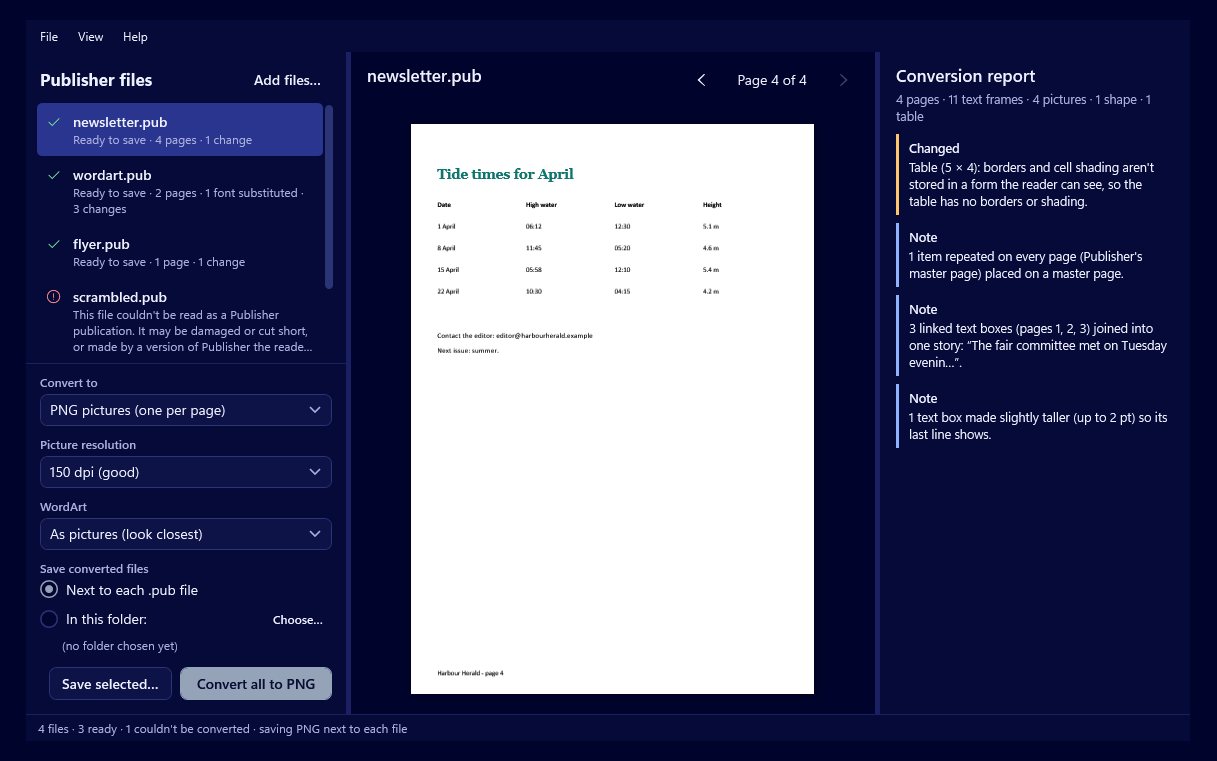
Pub Converter by Zaweba opens .pub files and saves them as PDFs, a PNG picture of each page, or Publish by Zaweba publications you can keep editing. Add one file or a whole folder, check the preview, then convert them all at once. You don't need any other publishing program installed.
Every file gets a plain report: which fonts were swapped for ones on your PC, and anything that couldn't be kept exactly, such as WordArt turned into a picture or table borders that didn't come across. Pictures come out byte for byte as they went in, at their original resolution.
Who it's for
- Anyone with years of newsletters and flyers saved as .pub files
- Offices clearing out an archive of old publications
- Clubs and schools that want to keep editing old templates
- IT staff converting files in bulk from a script
Good to know
- The .pub reader (the open-source libmspub) is built in, so nothing else needs installing
- Files saved in the 2000 format and earlier keep text, pictures and positions but not tables; the report says so
- Very old .pub files (from 1995 and earlier) can't be read
Private by design
- Works offline, with no account and no adverts.
- Checks zaweba.com once a day for a newer version, sending only the app's name.
- Problem reports and feedback are sent only if you click Send.
Everything you need, nothing you don't.
See it before you save
Each file is previewed page by page with the same renderer Publish uses, so the preview is exactly what you get.
An honest report
Substituted fonts and anything lost or changed are listed for each file. Save the report to keep it.
Whole folders at once
Drop in files or folders and Convert all saves every one, next to each .pub or in a single folder.
Pictures kept as inserted
Photos come out identical to the files originally placed, at full resolution, with their crops kept.
Fonts matched for you
Missing fonts are mapped to the closest installed family, from well-known equivalents to a font of the same kind.
Command line too
pubconvert.exe converts files from scripts and batch files, with a report and clear exit codes.
Back into an editable page
Choose .ozp and your publication opens in Publish by Zaweba as real, editable text frames with their fonts, sizes and colours. Stories linked across boxes stay linked, items repeated on every page become a master page, and page numbers become proper page-number fields. WordArt can come across as a picture or as editable text.
- Text stays editable
- Linked stories and master pages rebuilt
- Behind Publish's File > Import .pub
Damaged files handled calmly
A broken or fake .pub never crashes the app. You get a plain message saying what is wrong, such as a file cut short, a plain text file, or an SSH key that happens to share the .pub extension. Each file is read separately, so one bad file doesn't spoil the batch.
- Clear messages for damaged files
- Spots SSH keys with the same extension
- One bad file doesn't stop the rest
The details
| Works on | Windows 10 and 11 (64-bit) |
|---|---|
| Opens | .pub files |
| Converts to | PDF, PNG per page (72, 150 or 300 dpi) and Publish by Zaweba (.ozp) |
| Command line | pubconvert input.pub --to pdf, png or ozp, with batches, reports and exit codes |
| Version | Version 1.0.5 |
| Download | ZawebaPubConvert-1.0.5.zip (96 MB): unzip and run, no installer |
| Licence | Free for everyone, with every feature included. No warranty |
Pub Converter FAQ
Do I need another program installed?
No. Pub Converter reads .pub files itself, with the open-source libmspub reader built in, and works offline.
What doesn't come across?
Table borders and cell shading, bullet styles, WordArt arches and waves (drawn flat), gradients (the first colour is used) and picture recolouring. The report lists what changed in each file.
Is the PDF ready for a print shop?
It is a plain document PDF at the page size, like an ordinary Save as PDF. For bleed and crop marks, convert to .ozp and export from Publish by Zaweba.
Related apps

Publish
Lay out flyers, newsletters, posters, menus and cards with linked text and wrapping pictures, then export print-ready PDFs.
Explore Publish
A fast, offline PDF viewer that opens huge files in a blink, with tabs, quick search and thumbnails, lets you change the text in your PDFs, and prints them just how you want.
Explore PDF
Write
A simple, offline word processor with real pages, styles, tables and spell check. It saves .docx, so your files open anywhere.
Explore Write
Read
Reads the text in scans, phone photos, screenshots and scanned PDFs on your PC, and saves it as text, .docx, searchable PDF or CSV.
Explore Read
Try Pub Converter today.
Download Pub Converter by Zaweba: no account, no adverts, every feature included.