
ZIP by ZawebaOpen, mend and unlock any ZIP on your PC.
Make, check, repair and unlock ZIP files, all on your own PC. Build and extract ZIP archives, pull out just the photos or documents, check every file for damage, repair broken images and recover a password you set but have forgotten, all offline.
This version isn't signed for Windows yet: if SmartScreen warns you, choose More info › Run anyway. Why?
The Mac app isn't notarised by Apple yet: the first time, open it, then go to System Settings › Privacy & Security and choose Open Anyway. On Linux, make the AppImage executable (right-click › Properties, or chmod +x) and run it, or install the .deb.
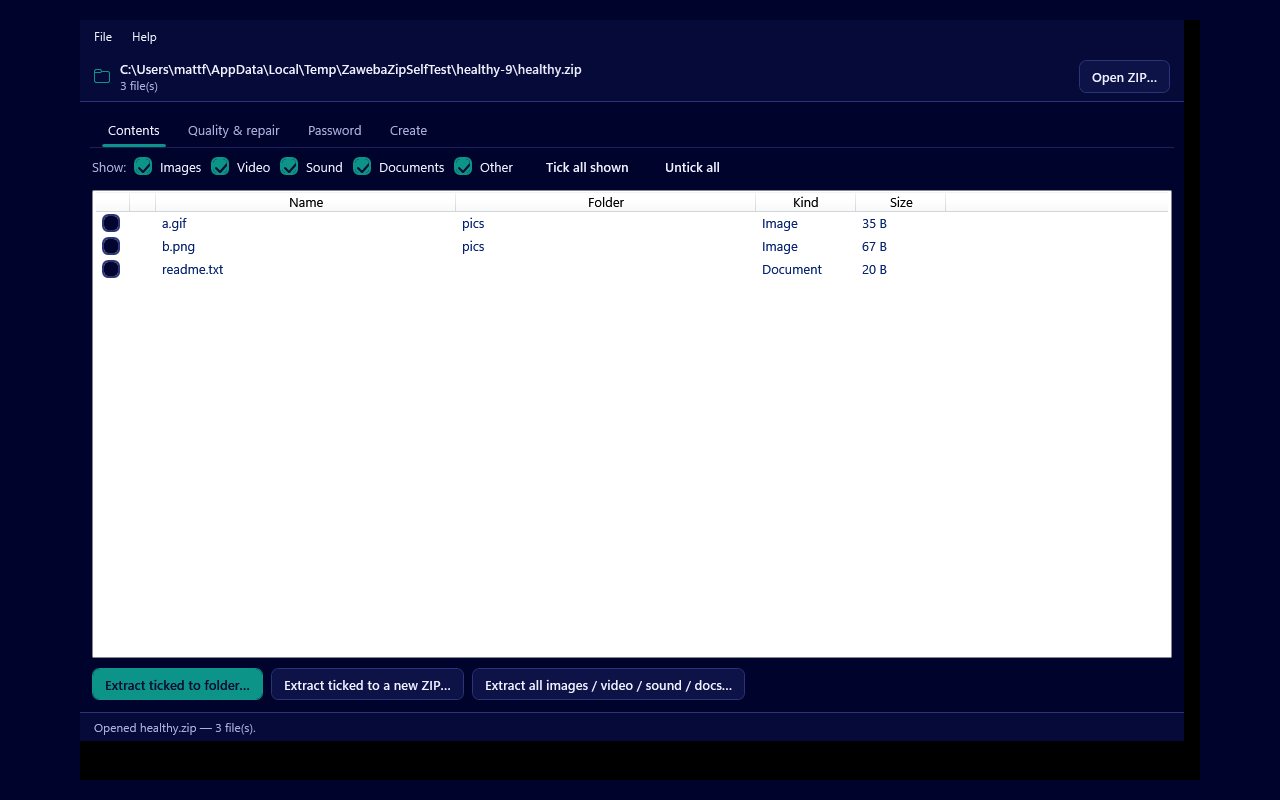
ZIP by Zaweba is a friendly archive tool for Windows, Mac and Linux that does far more than zip and unzip. Open any .zip and see what is inside, tick exactly the files you want, and extract them to a folder or straight into a new archive. It runs entirely on your own PC, with no account and nothing sent to the cloud.
It is also a rescue kit. It checks every file against the checksum the ZIP stored for it, repairs the structural faults that stop a photo opening, salvages files out of an archive that will not even open, and recovers a password you set yourself but have since forgotten.
Who it's for
- Anyone who needs to open, make or tidy up ZIP files
- People rescuing photos from an old or damaged archive
- Anyone who has forgotten the password to a ZIP they made themselves
- Anyone who wants just the pictures or documents out of a big archive
Good to know
- Download it and run it: no account, no sign-up.
- Works with the other Zaweba apps you have installed.
Private by design
- Works offline, with no account and no adverts.
- Checks zaweba.com once a day for a newer version, sending only the app's name.
- Problem reports and feedback are sent only if you click Send.
Everything you need, nothing you don't.
Pick out just what you need
Filter the contents by kind, images, video, sound or documents, tick the files you want, and extract them to a folder or into a fresh ZIP.
Make a clean archive
Zip up files and whole folders, keeping the folder structure, and choose how hard to squeeze: normal, smallest, fastest or no compression.
Check every file
Decodes each file and confirms the stored checksum, so a photo that was corrupted after it was zipped, or already damaged before, is flagged Good, Corrupt or Damaged.
Repair broken images
Fixes the structural faults that stop a viewer opening an otherwise good JPEG, PNG or GIF, and writes the mended files to a new ZIP.
Salvage a dead archive
Won't the ZIP open at all? It scans the raw bytes for each stored file and pulls out everything it can, around the broken directory, into a clean new archive.
Recover your own password
Forgotten the password to a ZIP you made? It tries what you remember with common variations, a built-in list, your own wordlist and a bounded brute force, both ZipCrypto and WinZip AES.
Rescue the photos from a damaged ZIP
When an archive of photos goes bad, ZIP by Zaweba checks every file, repairs the images whose structure is broken and writes a clean copy with only the files worth keeping. It never re-encodes a picture, so it cannot invent missing pixels, but it makes many "won't open" files open again.
- Check finds corrupt and damaged files
- Structural repair for JPEG, PNG and GIF
- Save just the good files to a new ZIP
Recover a password you have forgotten
You set a password on a ZIP of personal photos and now you cannot remember it. Tell ZIP by Zaweba anything you recall, names, words, numbers, and it tries them with common variations, a list of common passwords, your own wordlist and a bounded brute force, showing a live count and letting you stop at any time. It is honest that a strong password you remember nothing about may not be recoverable.
- For a ZIP that belongs to you
- Hints, wordlists and bounded brute force
- Works with ZipCrypto and WinZip AES
Take out only what you want
Open a big archive and lift out just the images, or just the documents, with one click, or tick individual files and send them to a folder or a brand-new, tidy ZIP. No need to extract the whole thing first.
- Filter by kind: images, video, sound, documents
- Extract a whole kind in one click
- Send a selection straight to a new ZIP
The details
| Works on | Windows 10 and 11 (64-bit), macOS 12 or later (Apple silicon and Intel), Linux (64-bit, x86 and ARM) |
|---|---|
| Opens | ZIP archives, including ZipCrypto and WinZip AES password-protected ones |
| Makes | Standard ZIP archives (unencrypted), with a chosen compression level |
| Repairs | JPEG, PNG and GIF structural faults; salvage from a ZIP with a broken directory |
| Version | Version 1.0.2 |
| Download | ZawebaZip-1.0.2.zip (66 MB): unzip and run, no installer |
| Licence | Free for everyone, with every feature included. No warranty |
ZIP FAQ
Can it get into any password-protected ZIP?
No, and it is not meant to. It is for recovering a password to a ZIP that belongs to you, by trying likely candidates. A strong password you remember nothing about may never come out in a reasonable time, and the tool says so.
Will repairing an image bring back the missing part of a photo?
Not the missing pixels. Repair fixes the structure that stops a viewer opening the file, so a truncated photo may open but still be only partly visible. It never re-encodes the picture.
Does it make password-protected ZIPs?
Not yet. New archives are written unencrypted, the kind every program opens. Reading and unlocking protected archives is fully supported.
Related apps

Backup
Mirror, Echo or two-way sync to a USB stick, second drive or network share, with a preview first and old copies kept safe.
Explore Backup
FTP
FTP, FTPS and SFTP with a proper code editor, a live preview, sync with a preview, Save for Web and a server-side trash.
Explore FTP
Disk Sort
A disk space analyser and photo sorter in one window: treemaps, duplicates and cleanup beside keepers, stars, tags and safe file moves.
Explore Disk Sort
Burn
Burn data, audio CDs and ISO images to disc, read data discs to ISO, build ISOs from folders, convert old image formats and mount them in one click.
Explore Burn
Try ZIP today.
Download ZIP by Zaweba: no account, no adverts, every feature included.