
Family by ZawebaYour family's story, carefully kept.
Build your family tree, print it big and keep it yours. People, relationships, events, sources and photos in five views, with GEDCOM 5.5.1 and 7.0 in and out, and charts that print beautifully.
This version isn't signed for Windows yet: if SmartScreen warns you, choose More info › Run anyway. Why?
The Mac app isn't notarised by Apple yet: the first time, open it, then go to System Settings › Privacy & Security and choose Open Anyway. On Linux, make the AppImage executable (right-click › Properties, or chmod +x) and run it, or install the .deb.
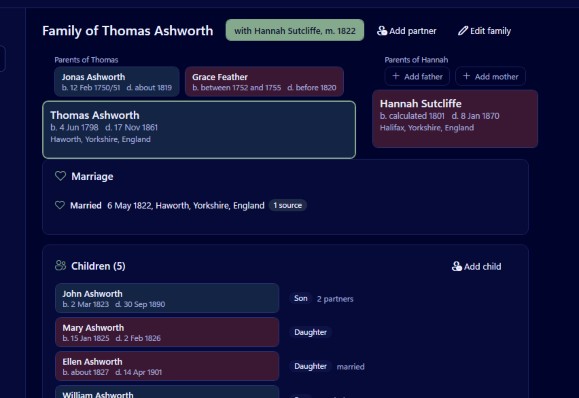
Family records the people in your family and how they are connected: names, births, marriages, census entries, occupations and every other event, each with its date, place, sources and photos. Look at the family as a family group, pedigree, descendants, fan chart or person profile, and click anyone to move to them.
No subscription, no account and no cloud. Bring research in from other programs with GEDCOM 5.5.1 or 7.0, and a clear report lists anything skipped or changed. When you are ready, print a wall chart across A4 sheets or one large sheet, or a family book with an index.
Who it's for
- Family historians who want their research on their own PC
- Anyone moving a tree from another program via GEDCOM
- Families making a wall chart or a book for a reunion
- Blended families who want step and adopted links shown properly
Good to know
- Charts and family books are made as PDFs and printed from there
- Photos can be stored inside the tree file or linked from where they are
- Can pick photos from folders you have sorted with Disk Sort by Zaweba
Private by design
- Works offline, with no account and no adverts.
- Checks zaweba.com once a day for a newer version, sending only the app's name.
- Problem reports and feedback are sent only if you click Send.
Everything you need, nothing you don't.
Real families, as they are
Partners, remarriages and children recorded as birth, adopted, step or foster to each parent, labelled clearly in every view.
Dates as records give them
About, before, between, dual dates and old calendars. Type "circa 1850" or "5 January 1850" and see how it was understood.
GEDCOM in and out
Import and export GEDCOM 5.5.1 and 7.0. Tags Family doesn't use are kept and written back out, and an import report lists the rest.
Charts that print well
Ancestor and descendant charts as PDF, tiled across A4 with glue strips and an assembly guide, or on one large sheet.
A family book
A PDF with a contents page, a section per generation written as sentences, portraits, numbered source notes and an index of names.
Tidy as you go
A duplicate finder with a merge wizard, and date checks that catch a parent younger than their child or a burial before a death.
Every family, clearly shown
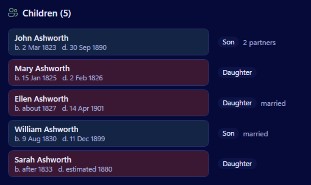
The family group view puts a couple with both sets of parents and their children on one page. Each partnership has its own tab, and children are labelled for what they are, such as "Stepdaughter of Joseph Hartley, daughter of Martha Crowther". Back and Forward buttons let you wander and return.
- Pedigree up to seven generations, with empty slots to add a missing parent
- Fan chart and descendants view
- Search by any name, place or range of years
Wall charts without the guesswork
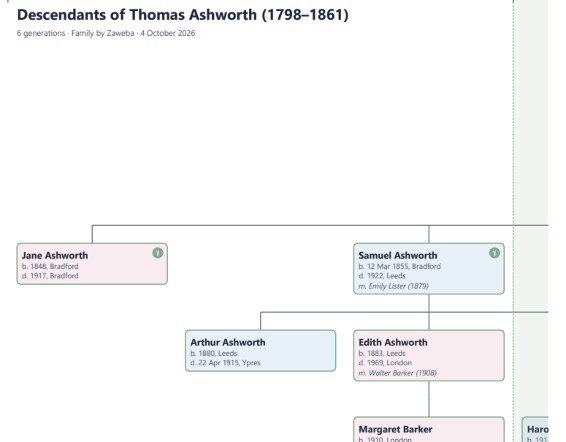
Printing a big tree on a home printer is fiddly, so Family does the planning. Every box sits on a grid, so sheet edges always fall in the gaps and no box is ever cut in half. The dialog shows the chart's size, the number of sheets and the smallest text before you print.
- Tiled on A4, A3 or Letter with overlap strips and trim marks
- One large sheet for a print shop, or fitted to A0 to A3
- Warns if any text would print below 7 pt
The details
| Works on | Windows 10 and 11 (64-bit), macOS 12 or later (Apple silicon and Intel), Linux (64-bit, x86 and ARM) |
|---|---|
| Imports | GEDCOM 5.5.1 and 7.0 (UTF-8, UTF-16, ANSEL, ANSI and more) |
| Exports | GEDCOM 5.5.1 and 7.0, PDF charts and family books |
| Files | .oft tree files, saved as you go |
| Paper | A4, A3, Letter, or one large sheet up to A0 |
| Version | Version 1.0.6 |
| Download | ZawebaFamily-1.0.6.zip (67 MB): unzip and run, no installer |
| Licence | Free for everyone, with every feature included. No warranty |
Family FAQ
Can I bring in my tree from another program?
Yes. Export a GEDCOM file from your current program and import it. Family reads GEDCOM 5.5.1 and 7.0 and gives you a report of anything it skipped or had to guess.
Will I lose details when I export again?
Family keeps tags it doesn't understand on the record they came from and writes them back out on export, so other programs' extras survive the trip.
How do I print a large chart at home?
Choose tiled printing. Family splits the chart across A4 sheets with shaded glue strips, trim marks, sheet labels and an assembly guide page.
Related apps

Disk Sort
A disk space analyser and photo sorter in one window: treemaps, duplicates and cleanup beside keepers, stars, tags and safe file moves.
Explore Disk Sort
A fast, offline PDF viewer that opens huge files in a blink, with tabs, quick search and thumbnails, lets you change the text in your PDFs, and prints them just how you want.
Explore PDF
Backup
Mirror, Echo or two-way sync to a USB stick, second drive or network share, with a preview first and old copies kept safe.
Explore Backup
Money
Accounts, statement import, budgets, bills and clear reports for households and sole traders, kept in one file on your PC.
Explore Money
Try Family today.
Download Family by Zaweba: no account, no adverts, every feature included.