
Easel by ZawebaWatercolour, oil and pencil that behave like the real thing.
Watercolour that blooms, oil that stays wet, pencil that catches the grain. A painting studio where every tool behaves like the real thing: watercolours run and bloom, oils stay wet and pencils catch the paper's grain.
This version isn't signed for Windows yet: if SmartScreen warns you, choose More info › Run anyway. Why?
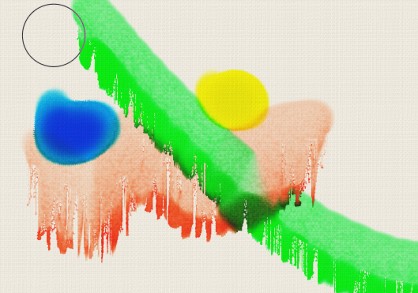
Easel by Zaweba is an artist's studio rather than a paint program. Every picture starts on a real surface, from stretched canvas and watercolour paper to brick, wood and blackboard, and every tool reacts to its grain and absorbency. Watercolours flow and bloom, oils build up and stay wet, and pencils darken pass by pass.
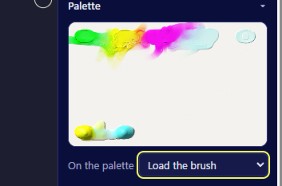
Colours mix like pigment, so blue and yellow really do make green. Tilt the canvas and wet paint runs downhill. Squeeze paint onto a palette, mix it with a knife and load your brush. When you're done, export a picture, carry on in Paint by Zaweba, or turn the whole session into a time-lapse.
Who it's for
- Painters who want watercolour without the ruined paper
- Sketchers who love the feel of graphite and charcoal
- Art students practising techniques before buying materials
- Street artists planning a wall in spray paint
Good to know
- Paints on your graphics card with WebGL2, so a decent graphics card helps; on a basic built-in chip wet paint moves a little slower
- Big canvases need plenty of memory: an A3 sheet at 300 DPI uses about 1 GB
- Uses the Microsoft Edge WebView2 Runtime, which comes with Windows 11
Private by design
- Works offline, with no account and no adverts.
- Checks zaweba.com once a day for a newer version, sending only the app's name.
- Problem reports and feedback are sent only if you click Send.
Everything you need, nothing you don't.
Twelve real surfaces
Canvas, watercolour papers, pastel paper in six colours, card, wood, brick, concrete and blackboard, each with its own tooth and absorbency.
Wet paint that flows
Watercolour runs, blooms, granulates and lifts. Gouache re-wets, acrylic dries fast and oil stays wet for impasto.
Pencils, pastels and pens
Graphite from 6H to 8B, coloured pencil, charcoal, pastels, chalk, crayon, biro, fountain pen, broad nib, felt tip and fineliner.
A palette you mix by hand
Squeeze paint from colour sets onto a palette, mix it with the knife and load the brush. Brushes run dry and get dirty.
Tilt the canvas
Turn a dial and wet paint runs downhill in proportion to how wet and thin it is. Dry paint never moves.
Masking tape and stencils
Lay down tape, paint on masking fluid or use built-in and SVG stencils, then peel them off for clean, hard edges.
Colour that mixes like paint
Easel mixes colour the way pigments do, with Kubelka-Munk maths on your graphics card, so blue and yellow make green instead of grey. Thick oil catches a light you can move, so impasto ridges show real highlights, and the scraper pushes wet paint aside to reveal what's underneath.
- Blue and yellow make green, wet or dry
- Impasto lit by a light you can move
- Flat light for judging colour and clean exports
Spray paint that drips
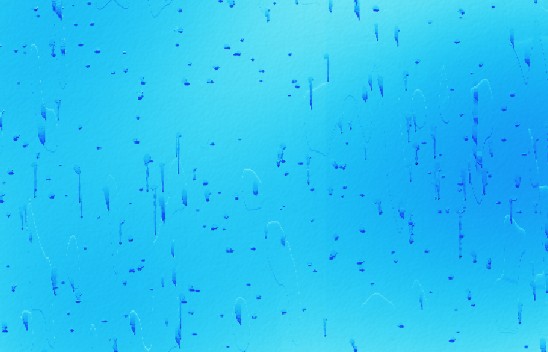
Spray with a nozzle size, distance and pressure you control. Go in close and overload it and the paint drips, more so on a tilted canvas. Pick brick or concrete as your surface and the texture shows through, just as it would on a real wall.
- Nozzle size, distance and pressure
- Drips when overloaded, more on a tilt
- Brick, concrete and wood surfaces
Every stroke, replayed
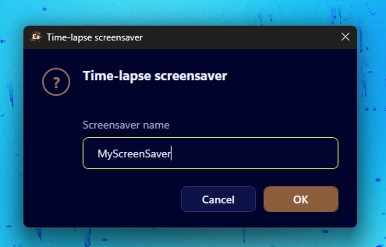
Easel keeps a frame after every stroke. Export the session as a WebM video, as a web page, or as a Windows screensaver through Screensavers by Zaweba. Save your picture as a .zeasel file and wet paint is still wet when you open it again tomorrow.
- Time-lapse as WebM video or a web page
- Turn it into a screensaver
- Wet paint stays wet in saved files
The details
| Works on | Windows 10 and 11 (64-bit) |
|---|---|
| Canvas sizes | A-sizes, squares or custom millimetres at 72 to 300 DPI, up to 24 million pixels |
| Saves | .zeasel, which keeps wet paint wet, the palette, masks and time-lapse |
| Exports | PNG, JPEG and TIFF at 1x or 2x; time-lapse as WebM video, web page or screensaver |
| Undo | 80 steps by default, including runs and drying |
| Version | Version 1.2.2 |
| Download | ZawebaEasel-1.2.2.zip (66 MB): unzip and run, no installer |
| Licence | Free for everyone, with every feature included. No warranty |
Easel FAQ
Is it like Rebelle, Painter or ArtRage?
It's in the same spirit: natural media that behave like the real thing on a real surface. Easel is its own program, written from scratch, free and fully offline.
Do I need a powerful graphics card?
A mid-range card paints smoothly even on an A3 sheet at 300 DPI. A basic built-in chip works too: Easel lets wet paint move a little slower rather than letting your strokes lag.
Can I carry on with a painting later?
Yes. Save it as a .zeasel file and everything comes back as you left it, including paint that hasn't dried yet, the palette, masks and the time-lapse.
Related apps
Paint
Layers, masks, live layer effects, a brush engine that feels like paint and one-click background removal, all offline on your own PC.
Explore Paint
Screensavers
Starfield warp, Aquarium, Deep space, Night motorway, a big clock, your photos and more, with live previews, plus screensavers made from your own web pages.
Explore Screensavers
Video
A multi-track video editor with titles, transitions and auto-ducking, plus an Episode Builder that turns a script and AI clips into a finished episode.
Explore Video
Vectornation
Pen, shape builder, live effects, brushes, gradient mesh, image trace, print-ready PDF/X and professional type, opening and saving SVG, PDF, AI, EPS, DXF and DWG.
Explore Vectornation
Try Easel today.
Download Easel by Zaweba: no account, no adverts, every feature included.