
News, ideas and behind the scenes.
Product news, the thinking behind the apps, and deep dives into how they work.

Flowing a newsletter story across pages with linked frames
A newsletter workflow in Publish by Zaweba: link text frames so a story flows from box to box and page to page, with a red plus when there is more to say.

Headers, footers and page numbers on real pages in Write
How Write by Zaweba lays out headers, footers, page numbers, footnotes and sections on the page exactly as they will print and export to PDF.
Arranging a song on the drag-and-drop grid in Loop
How the grid in Loop by Zaweba works: drop loops onto tracks and bars, stretch them to repeat, move and copy them, and drop in your own audio and MIDI.
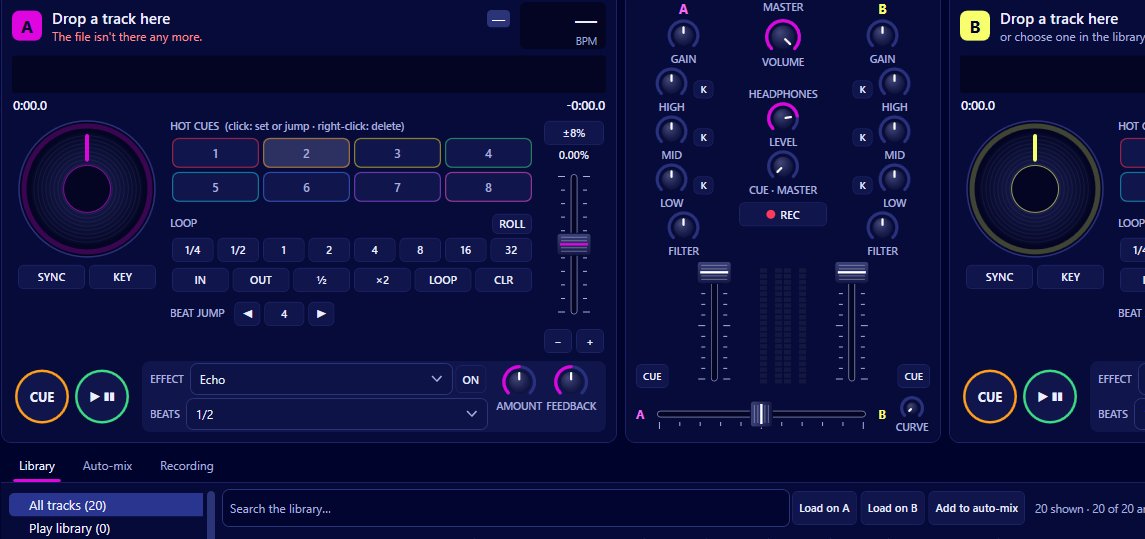
How sync in Mix by Zaweba keeps two tracks locked together
Sync in Mix matches the tempo of the other deck and keeps the beats phase-locked while it is on, so a track you start lands on the beat.
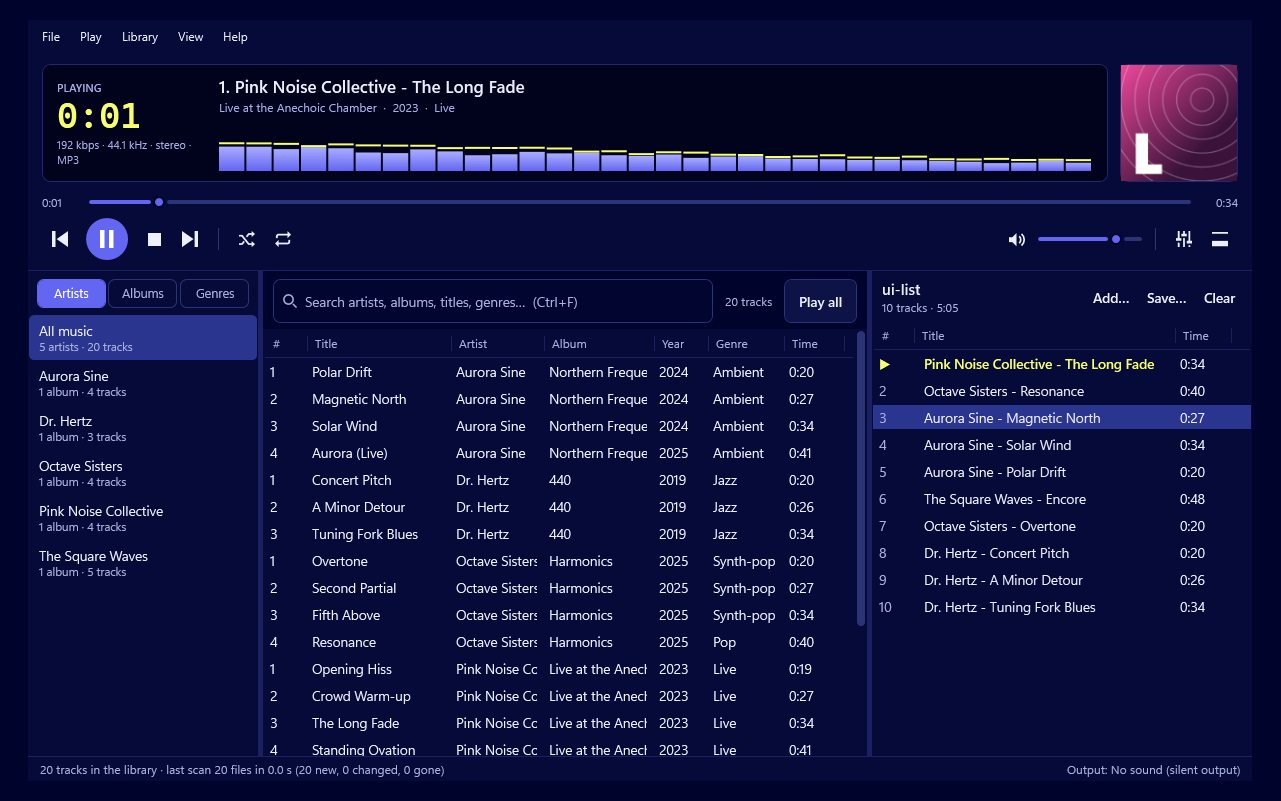
Finding any track in a big library as you type
How the library in Play by Zaweba works: browse by artist, album or genre, and every word you type narrows the results at once, even across 20,000 tracks.

Many features: when a long feature list helps and when it gets in the way
A practical look at feature-rich software: where long feature lists come from, how to learn a big app calmly and how to choose what you really need.
Trimming a long video in seconds with a lossless cut
Cut by Zaweba saves a lossless cut by copying the original packets, so nothing is re-encoded, quality is untouched and an hour-long file is done in seconds.

Getting to grips with the multi-track timeline
A first look at the timeline in Video by Zaweba: trim, split, ripple delete, link and unlink, freeze frames and markers, with undo that covers every edit.
Quick and simple software for Windows that respects your PC
How to choose small, focused Windows software that starts fast, suits older PCs and costs nothing, with QR codes as a worked example.
Making a typeface with a stack of sliders
How the style stack in Font by Zaweba works: weight, contrast, width, slant and more, applied to every letter at once and easy to reorder or reset.

Can I undo changes in a PDF editor?
Yes. PDF by Zaweba gives every change a named undo step on Ctrl+Z, redo on Ctrl+Y, and Revert to saved to go back to the file as it was opened.

Keyframes, motion presets and audio in Paint by Zaweba
Animate position, scale, rotation, colour and warp with keyframes and easing curves in Paint by Zaweba, add Pan and Zoom presets, audio and storyboard export.
Frame-by-frame animation with onion skins in Paint by Zaweba
Draw hand-made animation in Paint by Zaweba with animated layers, cels and red and green onion skins, then play it as a loop, ping-pong or once.
Making smaller animated GIFs with Paint by Zaweba
Shrink animated GIFs in Paint by Zaweba with shared or per-frame palettes, dither control, frame differencing and a lossy threshold, all in its own GIF writer.
How to link PDF pages to a web address
Link to a web address from a PDF in PDF by Zaweba with a bookmark action, or with Pages > Page actions so a site opens when a page opens or closes.
Instant animations with Filter > Animation in Paint by Zaweba
Filter > Animation in Paint by Zaweba builds animated frames from Rippling, Waves, Spinning Globe, Blend and Burn-In, ready to tweak and export as a loop.
Your first ten minutes on the Anima timeline
Layers, keyframes, frames, onion skinning and a playhead you can scrub: a gentle first look at the timeline in Anima by Zaweba for anyone new to animation.
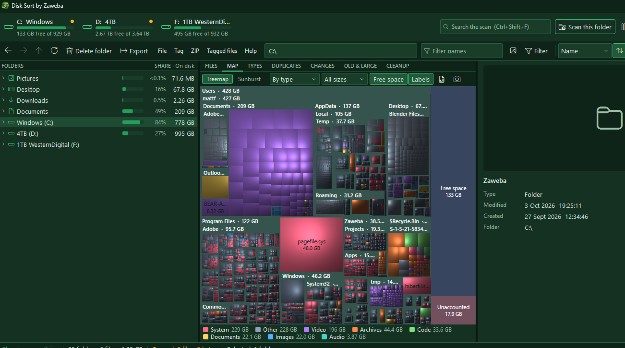
Download with confidence, then keep your Downloads folder in order
How to download software safely on Windows, what easy to install should really mean, and how to tidy the Downloads folder once it fills up.
How to reload a PDF that changed on disk
When another program changes an open PDF, PDF by Zaweba can reload it for you, asking first if you have unsaved changes, and Undo takes you back.
Scripting Paint by Zaweba with C# and the Script Console
Write C# scripts in Paint by Zaweba: run .csx files, test code in the Script Console and drive documents, layers, filters, actions, saving and printing.
How to batch rename image files with Paint by Zaweba
Batch Rename in Paint by Zaweba renames whole folders with name, number, date and folder patterns, regex find and replace, a live preview and clash checks.
Droplets and Script Events: automation in Paint by Zaweba
Make a desktop Droplet that runs a saved batch on dropped files, or have Paint by Zaweba run an action automatically on open, save or export.
Making many versions from a spreadsheet in Paint by Zaweba
Image > Variables in Paint by Zaweba links text, images and visibility to CSV or TSV rows, then exports one file per row. Ideal for badges, cards and labels.
How to set PDF preferences for a whole team
Give a team the same PDF by Zaweba settings with a defaults.json file: default values for everyone, plus locked keys that users can't change.
How to set the units to inches or millimetres
Change units in PDF by Zaweba under Edit > Preferences > Units: choose millimetres, centimetres, inches or points, then press OK to apply it.
Using the animation Timeline in Paint by Zaweba
View > Timeline in Paint by Zaweba animates frames and video clips with tweens, fades and keyframes, then exports GIF, WebP, PNG sequences, WebM or MP4.
Which keyboard shortcuts does a PDF viewer have?
PDF by Zaweba lists every shortcut under Help > Keyboard shortcuts, and Ctrl+K opens a command palette that runs any command from a few typed letters.
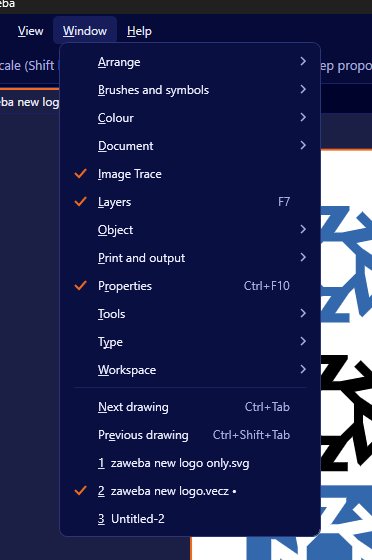
A first tour of the drawing tools in Vectornation
Pen, curvature, pencil, knife, scissors, shape builder, live paint and live shapes in Vectornation by Zaweba, and which tool to reach for first.
How to add page transitions to a PDF slideshow
Add page transitions in PDF by Zaweba with Pages > Page transitions: eleven effects with length and direction, plus timed page turns in full screen.
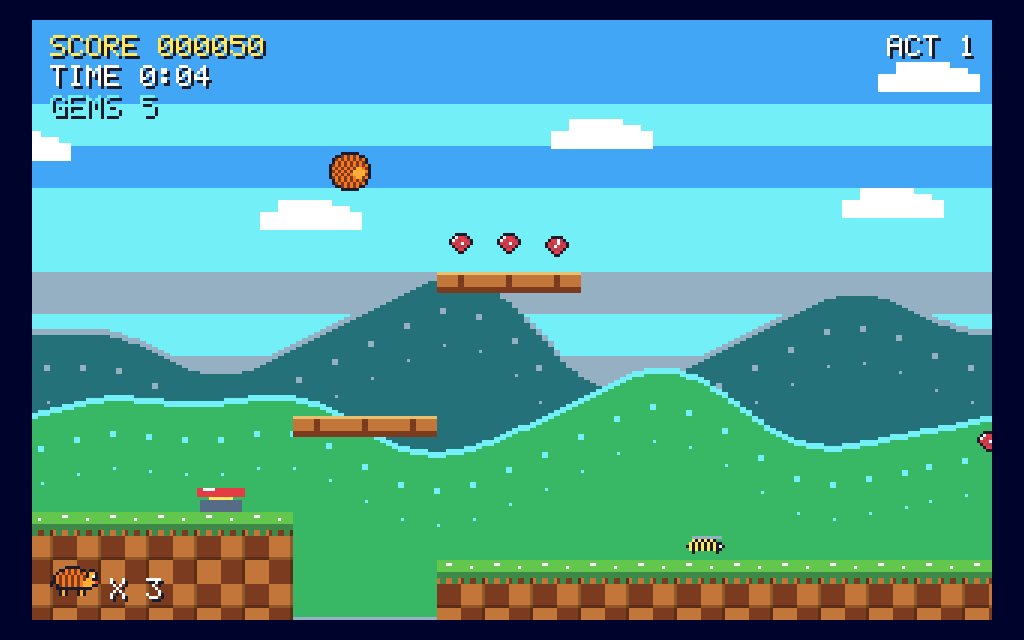
A retro bike delivery game: the paper round
Paper Round in Games by Zaweba: deliver the morning papers by bike for a whole week, dodging dogs, cars and grannies with shopping trolleys.
What is a PDF portfolio and how do I open one?
A PDF portfolio is a collection of files inside one PDF. PDF by Zaweba shows it as a file list with folders and opens each PDF in it in a tab.
History, snapshots and non-linear undo in Paint by Zaweba
Set undo limits, keep snapshots inside the .ptx, branch with non-linear history and keep undo after reopening a file in Paint by Zaweba.
Recording a time-lapse of your painting in Paint by Zaweba
Record Time-Lapse in Paint by Zaweba grabs a frame whenever the picture changes, then exports MP4, WebM, GIF, WebP or PNG frames of your process.
Importing screenshots, scans and video frames into Paint by Zaweba
File > Import in Paint by Zaweba captures the screen or a window, scans through Windows, brings in video frames as layers and opens the clipboard.
How to see earlier versions of a saved PDF
File > Earlier versions in PDF by Zaweba opens each incremental save inside a PDF in a tab of its own, so you can look back at how the document was.
Sharing huge images with Deep Zoom tiles in Paint by Zaweba
File > Export > Deep Zoom Tiles in Paint by Zaweba writes a DZI pyramid and a self-contained HTML viewer, so very large images zoom smoothly in a browser.
Recording and playing Actions in Paint by Zaweba
The Actions panel in Paint by Zaweba records commands, filters, adjustments and even brush strokes, with stops, conditionals and Button Mode for one-click jobs.

Choosing your surface in Easel before the first stroke
A beginner's guide to the twelve surfaces in Easel by Zaweba, from canvas and watercolour paper to brick and blackboard, and how each one changes the paint.
How to set the page and zoom a PDF opens at
Use File > Initial view in PDF by Zaweba to write into a PDF how it should open, so every reader starts with the view you chose. Binding is there too.
A platform game with a knight and a castle
Castle Knight in Games by Zaweba: a small knight with a big sword storms a castle of bats, skeletons and spikes to face the Stone Gargoyle.
How to change the title and author of a PDF
Change a PDF's title, author, subject and keywords in PDF by Zaweba with Document properties (Ctrl+D), then save. XMP and custom fields are there too.
Printing from Paint by Zaweba with a live page preview
File > Print in Paint by Zaweba shows a live preview with paper, scale, anchor, margins, borderless and crop marks, and can save the same pages as PDF.
Picture Package and Contact Sheet in Paint by Zaweba
Lay out several prints per page, from wallet to ID photo 35x45 mm, or turn a folder into pages of captioned thumbnails with Paint by Zaweba.
A digging game with diamonds and boulders
Rock Digger in Games by Zaweba: dig through six scrolling caves for diamonds while boulders tumble and fireflies roam. Original, free and offline.
Exporting CMYK and spot colour separations in Paint by Zaweba
File > Export > Separations in Paint by Zaweba writes C, M, Y, K and spot plates as PNG, TIFF or one labelled PDF, with registration marks and halftones.
Content credentials in Paint by Zaweba: proving no AI was used
Switch on content credentials in Paint by Zaweba and every JPEG and PNG carries a signed C2PA record saying which software made it and that no AI was used.
How to see which fonts a PDF uses
List a PDF's fonts in PDF by Zaweba from Document properties: each font's kind, whether it is embedded or a subset, and where in the file it is used.
Working with layers that stay editable in Paint
How pixel, text, shape, group and adjustment layers in Paint by Zaweba let you change your mind about any part of a picture, long after you made it.
Adding copyright and metadata with File Info in Paint by Zaweba
File Info in Paint by Zaweba writes title, author, copyright, keywords, rating and GPS as XMP into JPEG and PNG, and reads XMP and EXIF from photos.
Save for Web in Paint by Zaweba: smaller files, same look
Use Save for Web in Paint by Zaweba to compare formats side by side, cut PNG-8 and GIF palettes, try AVIF and aim for a target file size.
Importing and saving PDFs in Paint by Zaweba
Bring PDF pages into Paint by Zaweba at a chosen resolution, then save artboards as PDF pages with crop marks, PDF layers and vector text and shapes.
Cutting a design into slices with Paint by Zaweba
The Slice tools in Paint by Zaweba cut one design into named images with their own format and quality, then Export Slices writes them with an index.html.
A neon light-cycles game against the computer
Light Trails in Games by Zaweba: neon light-cycles in a dark arena, where you box the computer in with your wall of light before it boxes you in.
Generate image assets from layer names in Paint by Zaweba
Name a layer logo.png or hero@2x.png and Paint by Zaweba exports it to an assets folder on every save. How to name layers for sizes, quality and folders.
Export As and Quick Export in Paint by Zaweba
Export artboards or each visible layer at several sizes in one go with Export As in Paint by Zaweba, or send a picture out with one click using Quick Export.
How to read a PDF in full screen
Press F11 or Ctrl+L in PDF by Zaweba to read a PDF full screen, use read mode with Ctrl+H, and set one-page, black background or timed page turns.
A retro helicopter rescue game for PC
Chopper Rescue in Games by Zaweba: fly a rescue helicopter behind enemy lines, blast huts open and bring the hostages home past tanks and jets.
How to see the files attached inside a PDF
Open the Attachments panel in PDF by Zaweba to list files embedded in a PDF, open or save them safely, add your own, or remove ones you don't want.

Is there a Mac or Linux version of this to-do app?
Task List by Zaweba also comes for macOS and Linux, with a menu-bar or tray icon, its own reminder pop-ups plus system notifications.
Soft proofing and the gamut warning in Paint by Zaweba
Preview print and screen output before you commit: Proof Colours, Gamut Warning and colour blindness simulation in Paint by Zaweba explained.
How to view two PDF pages side by side
Show two PDF pages side by side in PDF by Zaweba with View > Page layout > two-page, add a cover page so spreads line up, or scroll in pairs.
A key bashing athletics game for PC
Track Champ in Games by Zaweba is key-bashing 8-bit athletics: sprint, jump and throw through five events, from the heats to the final. Original, free.
How to open an animated GIF to edit in Paint by Zaweba
Animated GIF, WebP and APNG files open in Paint by Zaweba as Timeline frames, as plain layers, or as just the first frame. Here is when to pick each.
Is there an old-style racing game for PC?
Coast Racer in Games by Zaweba is a 16-bit road race along a sunny coast: beat the clock to every checkpoint through five stages, with two gears.
Opening EXR, HDR, RAW and FITS files in Paint by Zaweba
Paint by Zaweba opens EXR and Radiance HDR as 32-bit, RAW through the RAW Developer at 16-bit, and FITS astronomy files at 16-bit. What that means for you.
How to add a ruler or grid to a PDF view
Turn on rulers and a grid with View > Rulers and grid in PDF by Zaweba, set the grid spacing, snap to it, and drag guides out from the rulers.
Viewing HDR images with 32-bit preview in Paint by Zaweba
View > 32-bit Preview Options in Paint by Zaweba sets exposure and gamma for viewing HDR documents live, without changing a single pixel underneath.
Dither, quantise and trap in Paint by Zaweba
Reduce colours with five dithering methods, or spread inks for print with Image > Trap. A practical guide to both tools in Paint by Zaweba.
How to see and hide the layers in a PDF
Open View > Layers in PDF by Zaweba to see a PDF's layers, show or hide each one, limit the list to the current page, and reset to the default view.
Working in 16-bit and 32-bit in Paint by Zaweba
How 8, 16 and 32 bits per channel differ in Paint by Zaweba, when to switch with Image > Mode, and what happens to filters and exports at each depth.
A missile defence game protecting six cities
City Shield in Games by Zaweba: missiles rain down on six cities, and you click to burst interceptors in their path. Original, free and offline.
What are PDF page labels?
Page labels give PDF pages numbers like i, ii, iii or A-1 that match the printed page. PDF by Zaweba sets them for ranges of pages in Pages > Page labels.
Greyscale, indexed, bitmap and duotone modes in Paint by Zaweba
Image > Mode in Paint by Zaweba truly converts pixels to greyscale, indexed palettes, one-bit bitmap or duotone inks. Here is what each mode is for.
CMYK and Lab colour documents in Paint by Zaweba
Paint by Zaweba keeps true CMYK and Lab values on every pixel layer, so print files and Lab TIFFs open, edit and save without a trip through RGB.
A brick breaking bat and ball game for PC
Brick Smash in Games by Zaweba is bat and ball against a wall of bricks, with capsules for a wide bat, multi-ball, a laser and more. Twelve walls.
Colour settings and ICC profiles in Paint by Zaweba
Set working RGB, CMYK and grey spaces, assign or convert profiles and embed them on export with Edit > Colour Settings in Paint by Zaweba.
A moon landing game with limited fuel
Moon Lander in Games by Zaweba: a vector-drawn craft, jagged lunar hills and not quite enough fuel. Touch down gently on the pads to score.
Managing presets with the Libraries panel in Paint by Zaweba
One panel in Paint by Zaweba manages swatches, gradients, brushes, styles and more, and imports .grd, .pat, .acv, .alv and .asl presets from other apps.
Swatches and palettes from photos in Paint by Zaweba
Import and export swatches in GIMP, Adobe, Paint.NET, Krita, CSS and JSON formats, and pull 2 to 32 colours from any image in Paint by Zaweba.
Measuring, counting and notes in Paint by Zaweba
The Info panel, Ruler, Count and Note tools and the analysis commands in Paint by Zaweba help you measure, straighten, count and record in pictures.
Sampling colours anywhere on screen with Paint by Zaweba
Pick a colour from any app or monitor with the pipette, average samples with the Eyedropper and keep up to ten sampler points in Paint by Zaweba.
Colour harmonies, wheels and a wet mixer in Paint by Zaweba
Colour schemes from harmonies worked in OKLCh, four colour wheels with gamut masks and a wet mixing palette, all in Paint by Zaweba.
How to recover an unsaved PDF after a crash
PDF by Zaweba copies unsaved work every 60 seconds and offers to recover it when the app next starts, so a crash or power cut costs you very little.
A girder climbing game with barrels to dodge
Girder Climb in Games by Zaweba: climb a building site's sloping girders while a grumpy goat kicks barrels down at you. Six screens, original and free.
How to add bookmarks to a long PDF
Add bookmarks to a long PDF in PDF by Zaweba with Ctrl+B, arrange them into levels, or make them from the document's headings in the accessibility tools.
How to liquify or reshape a face in a photo
Fluid Warp in Paint by Zaweba is a liquify tool with a hand-placed Face Guide whose sliders change eyes, nose, mouth, jaw and face width.
Is there a command line tool for PDFs?
Yes. PDF by Zaweba has a command line: --inspect reports on a file, --render draws a page as a picture and --extract-text pulls out the text, offline.
Softening the last step with Fade in Paint by Zaweba
Edit > Fade in Paint by Zaweba lowers the opacity or changes the blend mode of your last filter, adjustment, fill or brush stroke, with a live preview.
A road and river crossing game for PC
Hop Across in Games by Zaweba: help a brave toad hop over a busy road and ride logs and turtles home across the river. Original, free and offline.
Offset, Minimum, Maximum and convolution in Paint by Zaweba
Four technical filters in Paint by Zaweba: Offset for tiling, Minimum and Maximum for shrinking and growing masks, and Custom Convolution for your own kernels.
Building your own filters with Filter Graph in Paint by Zaweba
Filter Graph in Paint by Zaweba wires filters, colours and blend nodes into custom filters and textures you can save as presets and run in batches.
Running filters on masks and channels in Paint by Zaweba
In Paint by Zaweba, filters run on a layer mask, Quick Mask or channel as a grey picture, so blur, noise and more can shape your masks.
Picking colours with Shades, Picker and Fade Square in Paint by Zaweba
The Colour panel in Paint by Zaweba: a Shades grid of tints and tones, a full picker with Lab and CMYK, and a Fade Square that blends four corners.
How to add a border or film frame to a photo
Paint by Zaweba's decor filters add a plain border, round corners, a fuzzy border or a film frame to a photo in a few clicks, free and offline.
An old-style maze chase game for PC
Maze Muncher in Games by Zaweba is an EGA-style maze chase: gobble every dot while four gloops hunt you down, each in its own sneaky way. Free.

One-click episode export in Video by Zaweba
One-click episode export in Video by Zaweba makes captions if needed, renders the video and writes an .srt, a 1280x720 thumbnail and a shot list.
Turning photos into paintings and sketches in Paint by Zaweba
Oil Paint, Cartoon, Van Gogh, sketch and texture filters in Paint by Zaweba turn photos into paintings, drawings and crafted surfaces.
How to automate PDF tasks on many files
Automate repeated PDF jobs with PDF by Zaweba: build an Action from saved steps, run it on files or a whole folder, or let a watched folder do it for you.
Colour filters and Pixel Maths in Paint by Zaweba
Alien Map, Colour Exchange, Palette Map, Normal Map and a per-channel formula filter with presets: the colour filters in Paint by Zaweba explained.
Can PDFs be processed automatically in a folder?
Yes. With Tools > Watched folders in PDF by Zaweba, every PDF you drop into a folder goes through an Action, with results in Processed and originals kept.
Introducing the Zaweba Suite
Fast, private Windows apps under one roof, and why we built them as a suite.
Why we build offline-first software
Your files, your PC, your business. The case for software that doesn't need the cloud.
Brushes with a mind of their own
Canvas spin, automatic paths and gradient paint: a look inside the brush engine in Paint by Zaweba.