
How sync in Mix by Zaweba keeps two tracks locked together
Sync in Mix matches the tempo of the other deck and keeps the beats phase-locked while it is on, so a track you start lands on the beat.
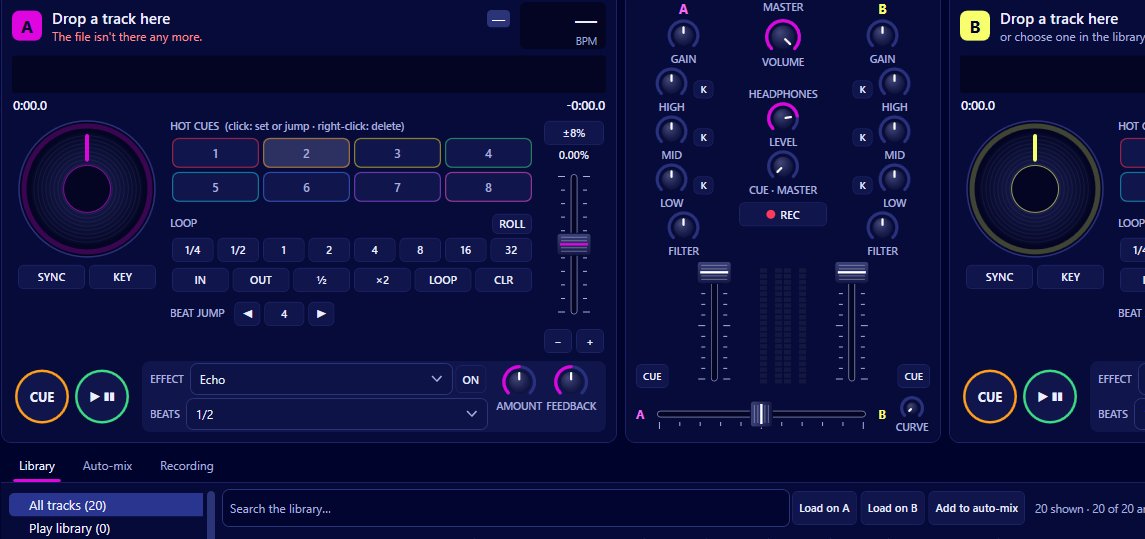
The first thing anyone learns when they start mixing is how quickly two tracks drift apart. You get the kick drums lined up, you feel good about it, and twenty seconds later it sounds like someone falling down the stairs. Beatmatching by ear is a real skill and worth learning, but it is also the thing that stops a lot of people enjoying their first few weeks behind the decks.
Mix by Zaweba has a sync button that takes that worry away. Turn it on and the deck matches its tempo to the other deck, then keeps the beats phase-locked for as long as sync stays on. That second part matters more than it sounds. Plenty of sync buttons match the speed once and leave you to it. This one holds the two together.
What sync actually does
There are two jobs in beatmatching. One is getting the tempo the same, so both tracks are running at, say, 124 BPM. The other is getting the beats in phase, so the kick on one track lands on the kick of the other rather than a fraction behind it. You can have matching tempos and still sound messy if the phase is out.
In Mix, sync handles both. The deck you sync follows the tempo of the other one, and the beats are kept phase-locked. If you then nudge the tempo of the leading deck, the synced deck follows. Press play on a synced deck and it lands on the beat, so you are not hunting for the right moment to let go of the platter.
The scrolling waveforms help here. Both tracks are drawn with their beats marked, so you can see the two lined up as well as hear it. When something sounds off, a glance at the waveforms usually tells you whether it is the beats or just two tracks that don't suit each other.
A simple way to use it
Load a track on each deck. Mix reads your own files through FFmpeg, so MP3, FLAC, WAV and M4A all work, and if Play by Zaweba is installed your library is already there. Start the first track playing to the room. On the second deck, switch sync on, find a sensible place to come in (the start of a phrase is a good bet), and press play.
Now the second track is running at the same tempo and in phase with the first. Bring it in with the crossfader or the channel fader, trim the bass on one of them with the EQ so the two low ends don't fight, and let the blend run. When the first track has had its moment, take it out.
If you have headphone cue set up, you can listen to the incoming track before anyone else hears it. That is a nice way to check you have picked the right moment, especially with tracks that have long, quiet intros.
Sync and key lock together
Matching tempo means speeding up or slowing down one of the tracks. Without key lock, that changes its pitch too, which can make a vocal sound odd and can push two tracks out of tune with each other. Mix has key lock for exactly this, so a track can move a few BPM and still sound like itself. The two features sit well side by side.
Is it cheating?
I've heard people say sync is cheating. I don't think it is. It is a tool, and it frees you up for the parts of DJing that the crowd actually notices: which track comes next, where you bring it in, how long the blend runs and what you do with the EQ while it does. Nobody on a dance floor has ever cheered for a manual beatmatch.
That said, if you want to learn to do it by ear, Mix doesn't stop you. Leave sync off, ride the tempo yourself and use the waveforms to check your work. Then turn it back on for the nights when you would rather think about the music.
Mix is free software under the EULA. It runs offline on Windows 10 and 11, with no account to make, and every feature is included. If you have a folder of music and fancy trying your hand at a blend, sync is the easiest place to start.

