
How to exclude a folder like node_modules from a backup
Keep node_modules and other generated folders out of a backup: add them to Skip folders named in a Backup by Zaweba pair. Works at any depth.
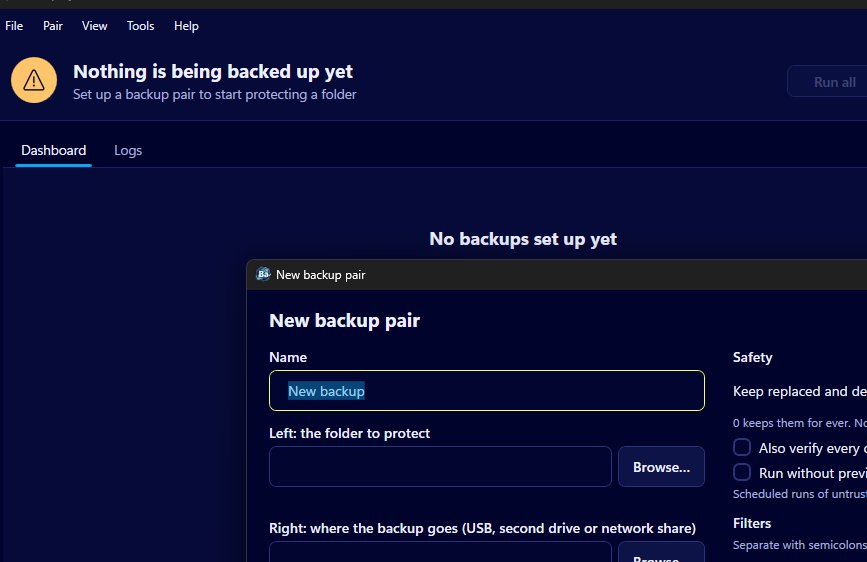
To keep a folder such as node_modules out of a backup in Backup by Zaweba, open the pair and type the folder's name into the filter called skip folders named. The rule works at any depth, so every node_modules folder inside the project tree is left out, and wildcards are allowed if you want to catch several names at once.
Generated folders like node_modules can hold huge numbers of small files that a project can rebuild from its package list whenever it needs them. Copying them slows every run and fills the backup drive with things you'd never restore by hand.
What to have ready
You need Backup by Zaweba and a pair for the folder that holds your projects, for instance a code folder on the left and a USB stick, second drive or network share on the right. If you haven't made the pair yet, File > New backup pair (Ctrl+N) starts one.
Write down the names of the folders you want to leave out. For a JavaScript project node_modules is the obvious one, but build output folders, caches and virtual environments are often worth skipping too. Use the names exactly as they appear in File Explorer.
Adding the rule
Open the pair editor, either straight away for a new pair or with Edit pair from the pair's card menu. Among the filters is skip folders named. Type node_modules there. To skip more than one folder, separate the names with semicolons, for example node_modules; dist. A * matches any run of characters and ? matches one, so a pattern can cover folders that share part of a name.
Save the pair and choose Preview and run from the card menu. The preview lists every file the run would copy, with counts and sizes. A pair that used to show a vast number of files should now show far fewer, and none of the listed paths should pass through node_modules. When it looks right, click Run.
What happens to copies already on the backup
Filters apply to both sides of a pair. Once node_modules is skipped, any copy of it already sitting in the backup is ignored rather than removed, even in Mirror mode. Backup by Zaweba won't move it to _zaweba_versions just because the source no longer sends it. It simply stops paying it any attention.
That's the safe behaviour, but it means old copies stay put. If you'd like the space back, delete those folders on the backup drive yourself once you're happy the rule is working.
Related settings that help
Two tick boxes on the same pair, skip hidden files and folders and skip system files and folders, are on by default, which already keeps a lot of tool clutter out. Version control folders are often hidden, though, so if you do want those copied, untick skip hidden files and folders for that pair and check the preview.
The size range can help too. An at most figure in MB keeps very large files out, such as disc images or big data dumps that land in a projects folder by accident. Leave it empty for no limit.
Skip these extensions handles single file types rather than whole folders. Logs and scratch files are common choices, and .tmp is skipped by default already, along with Office's ~$ lock files.
Keeping it working
When you start a new kind of project, look at its folder names and add any new generated folders to the same pair. A quick look at the preview every so often, or at the file count on the pair's card, shows whether something big has crept in. If the count jumps, the list of steps in the preview will show you which folder is responsible.

