
A free barcode generator for Windows
Barcode by Zaweba is free software for Windows that makes eight barcode types offline, with check digits, a live read-back and PNG, SVG and PDF export.
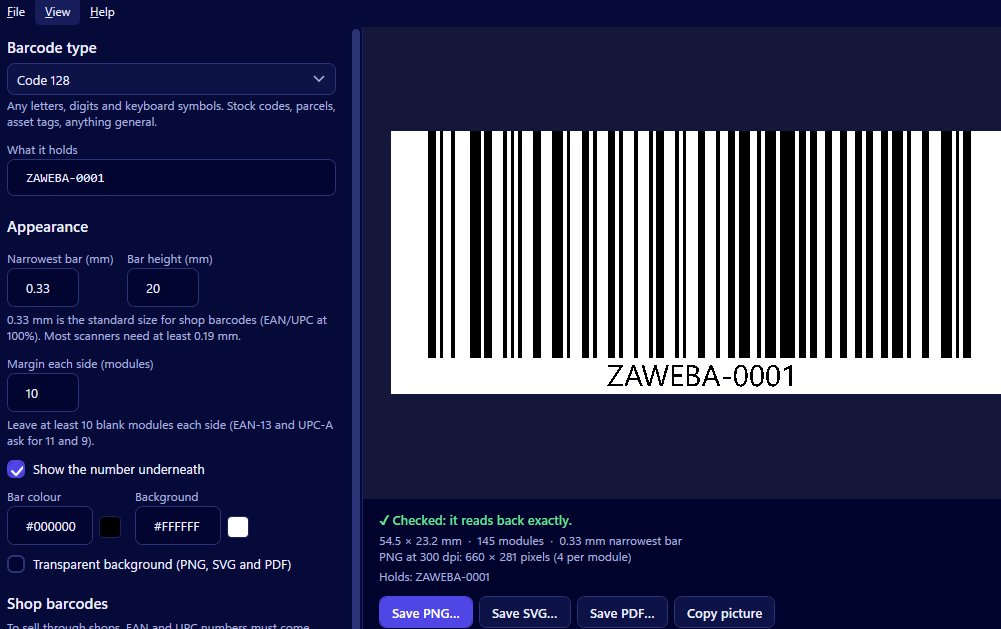
Barcode by Zaweba is a free barcode generator for Windows. It's free software under its licence, it works entirely offline with no account, and it makes eight barcode types with PNG, SVG and PDF export. It works out check digits for you and reads every barcode back so you know it scans.
It's a small, stand-alone program, so it suits small makers, shops, stock rooms and anyone who needs an asset tag or a shelf label without signing up to anything.
What it makes
The eight types cover most everyday needs. EAN-13 and UPC-A are the retail barcodes on products in shops, EAN-8 is the short version for small packs, and ITF-14 goes on outer cartons. Code 128 is the flexible all-rounder for stock codes, parcels and internal references, and it takes letters, digits and punctuation. Code 39 and Code 93 serve older systems that expect capitals, and Codabar matches libraries and some membership and parcel systems.
Each type is described in plain words inside the app, so you can tell which is which without looking it up.
Why free doesn't mean basic
A lot of free barcode tools draw bars and leave the rest to you. Barcode by Zaweba does the fiddly parts. For EAN, UPC and ITF-14 it adds the check digit if you leave it off, or checks it if you type it and shows the right digit when yours is wrong.
It also reads back every barcode it draws. On every change, the preview scans the code with a scanner library and says Checked if it reads exactly, or explains why not, such as colours too close together, light bars on a dark background, or a margin too small. If you try to save one that doesn't read back, it asks first.
Sizes are exact. You set the narrowest bar in millimetres, the bar height and the margin. The SVG keeps true millimetre widths, the PDF is a single vector page the size of the code, and the PNG stores its dpi so it prints at its real size.
Getting the most from it
Use Code 128 for anything you number yourself. Save SVG for packaging artwork and PDF for print shops; save PNG when you're printing at home or dropping a barcode into a document. Copy picture puts the barcode on the clipboard for pasting into Word, Excel or an email without saving a file.
Your type, bar width and colours are remembered between uses, so repeat jobs are quick. If you start the program with some data after its name, that data goes straight into the barcode, which is handy for a desktop shortcut that reopens a code you reprint often.
Always print one barcode and scan it with a real scanner before running off a batch. The read-back proves the drawing; a real scan proves your printer and label stock.
Other ways to do it
If your barcodes are heading for label sheets, Labels by Zaweba, also free, has the same creator under Insert > Barcode creator and can print a barcode on every label from a list. Barcode fonts in a word processor and online generators are the other common routes, though a font alone won't work out check digits or prove the code scans.
Mac and Linux versions of Barcode by Zaweba exist as well, built from the same code library. On Windows, it's a quick, free and private way to get a barcode that works.

