
Can you make barcodes offline, with no internet?
Yes. Barcode by Zaweba runs entirely on your PC, so you can make, check and save barcodes with no internet connection and no account.
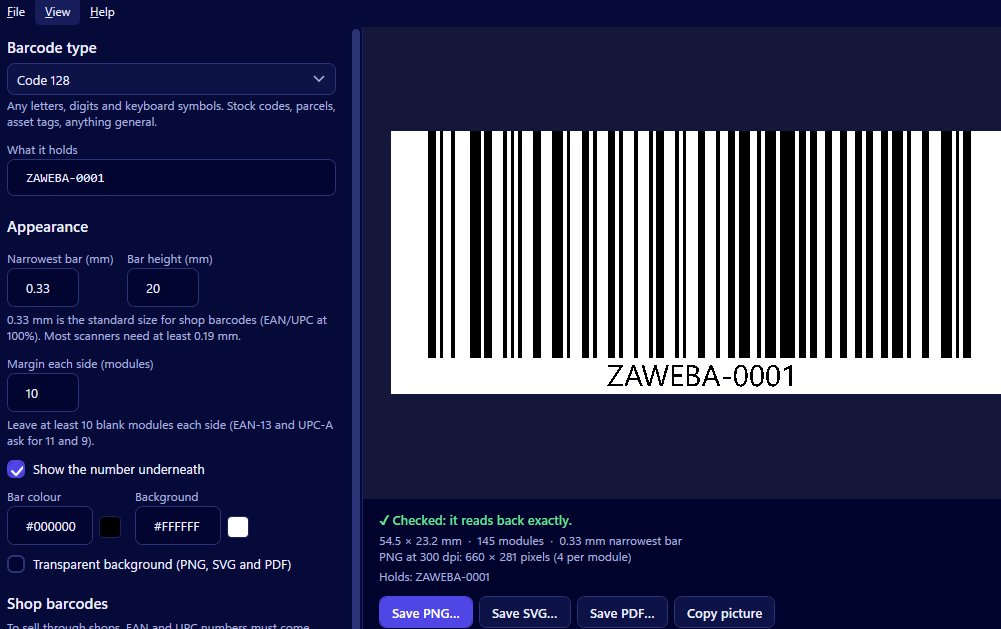
Yes, you can. Barcode by Zaweba runs entirely on your own PC, so it makes barcodes with no internet connection at all. There's no account to create and nothing is sent anywhere: you pick a type, type the number, check the read-back and save the file, all locally.
That suits more situations than you might think, from a stock room with poor Wi-Fi to a business that would rather its product numbers didn't pass through someone else's website.
Why offline matters
Online barcode generators are convenient until they aren't. A warehouse or workshop may have patchy coverage. A laptop on a trade stand may have none. And some numbers are better kept private, such as product numbers for a launch that hasn't been announced, or internal asset and stock codes that describe your business.
With an offline program, none of that is a concern. The barcode is made on your computer, the file is saved on your computer, and the only place your numbers go is wherever you choose to put them.
Everything happens on your PC
All the parts of making a barcode happen inside Barcode by Zaweba. Check digits for EAN-13, EAN-8, UPC-A and ITF-14 are worked out or verified locally, with the right digit shown if yours is wrong. The live read-back, which scans every barcode as you change it and says Checked when it reads exactly, uses a scanner library built into the app rather than a web service.
Saving is local too. You can save a PNG at 150, 300, 600 or 1200 dpi, a vector SVG in millimetres or a one-page PDF the size of the code. Copy picture places the barcode on the clipboard so you can paste it into Word, Excel or an email without saving a file at all.
What you can make
The app makes eight types: Code 128, Code 39, Code 93, EAN-13, EAN-8, UPC-A, ITF-14 and Codabar. That covers retail products in shops, small packs, outer cartons, parcels and stock codes, asset tags and badges, and older systems such as libraries. Each type explains in plain words what it accepts and what it's for.
You also control size and look: the narrowest bar in millimetres, the bar height, the margin, whether the number shows underneath, and the bar and background colours. The app remembers your type, bar width and colours between uses.
One thing still comes from outside
Retail numbers for EAN-13 and UPC-A have to be allocated to you by your number allocator or supplier. That part of the process isn't something any barcode program can do for you. Once you have the number, though, making the barcode needs nothing but your PC.
Printing labels offline too
If your barcodes are going onto label sheets, Labels by Zaweba has the same creator built in under Insert > Barcode creator, and it also runs on your computer. It can print a barcode on every label from a list and export a PDF at the exact stock size.
Barcode by Zaweba is free software, with Mac and Linux versions as well as Windows. Install it once and you can make a barcode anywhere, connection or not. Print one and scan it with a real scanner before a big run, and you're done.

