
The options and settings file in Colour by Zaweba
Colour by Zaweba has three options (hide while picking, auto copy HEX, lower case hex) and keeps settings in a plain text file in AppData.
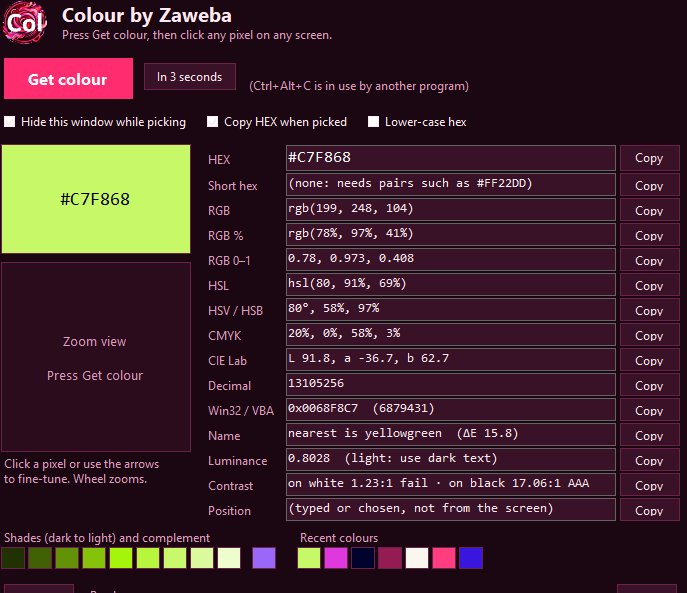
There isn't much to set up in Colour by Zaweba, and that's deliberate. Three options cover the choices people really make: hide the window while picking, copy the HEX automatically when a colour is picked, and write hex in lower case. Everything else just works, and what the app remembers is kept in a plain text file you can look at yourself.
Here's what each option does, why you might change it, and where your settings end up.
Hiding the window while you pick
When you start a pick, Colour freezes the whole desktop, every monitor, into one picture and lets you choose a pixel from it with the magnifier. With this option on, Colour's own window gets out of the way first, so it isn't sitting in that picture over whatever you wanted to sample.
For most people that's exactly right. If you'd rather the window stayed put, for instance because it lives on a second monitor well away from what you're sampling, the option lets you choose that instead.
Copying HEX the moment you pick
Every value in the window has its own Copy button, and Copy all (Ctrl+Shift+C) takes the lot. With automatic copying turned on, though, you don't need either for the most common case. Each time you pick a colour its HEX goes straight onto the clipboard, ready to paste into a stylesheet, a design program or a document.
Paired with the Ctrl+Alt+C hotkey, that makes a pick a three move job: hotkey, click, paste. The one thing to bear in mind is that each new pick replaces the last one on the clipboard. If you need several colours, the last 12 are kept as chips in the recent colours row, and clicking one loads it again.
Lower case hex for tidy code
Hex colours mean the same whether the letters are capitals or not, but code bases and style guides often settle on one. If yours uses lower case, turn this on and the hex values Colour shows and copies follow suit, so pasted colours match the rest of your file without editing.
A plain text file in AppData
Colour keeps your settings, the window's position and your recent colours in a plain text file in your own AppData\Zaweba\Colour folder. That's why the window comes back where you left it, and why the recent colours are still there after a restart.
Plain text is a deliberate choice. There's no hidden database and nothing stored online. You can open the file in any text editor to see what's in it, and copying the folder keeps your settings and recent colours with the rest of your backups. Because it sits in your own profile, other people who use the same PC with their own Windows accounts keep their own settings.
The program itself is just as simple. On Windows it's one small exe of about 230 KB that runs on the .NET Framework 4.8 already part of Windows 10 and 11, with no installer and no extra files. It makes no network connections at all. Settings, in other words, are the only thing it writes, and you know exactly where they are.
That keeps Colour light enough to leave running all day, ready for the next time Ctrl+Alt+C is pressed.

