
Chase dates and status: who is waiting in Contact by Zaweba
Set a chase date in Contact by Zaweba and it works out each record's status: waiting on you, chase due, waiting on them, sleeping or dead.
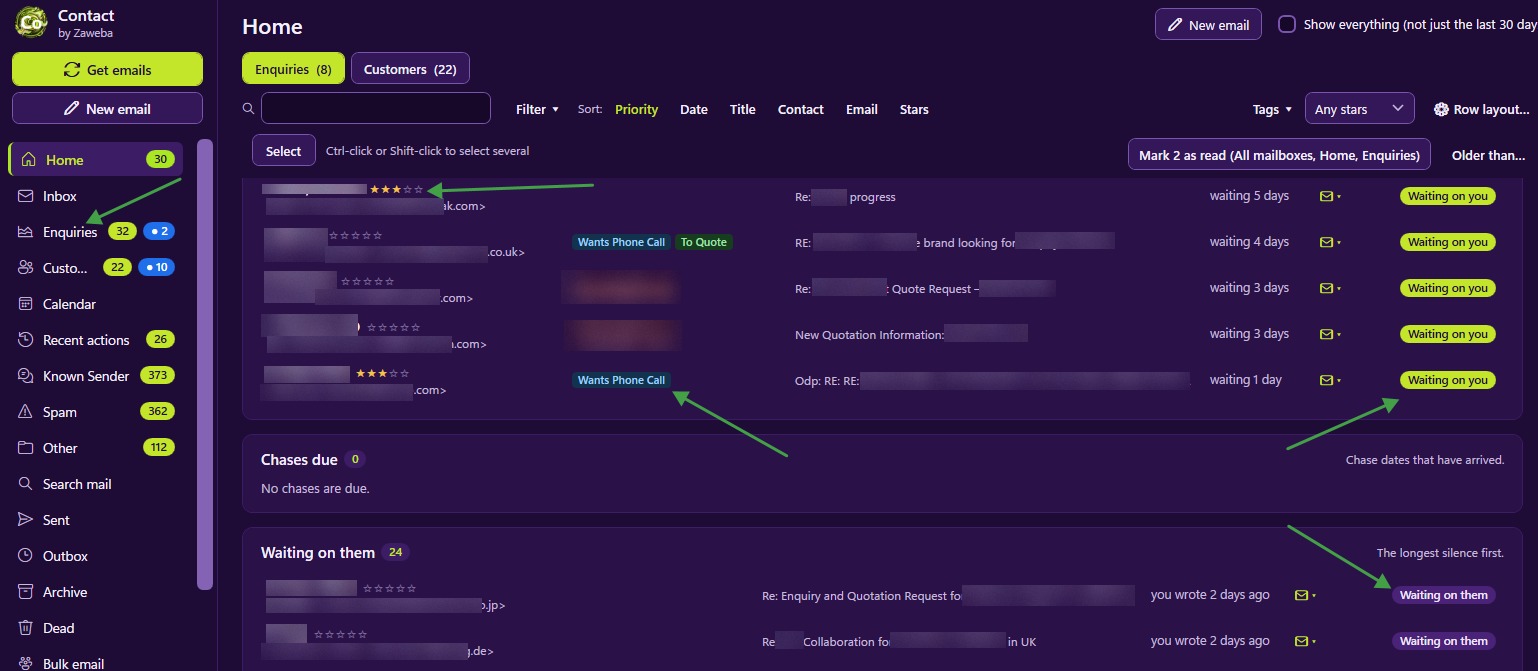
Enquiries rarely get lost because someone decides to ignore them. They get lost because the follow-up was meant to happen next Tuesday and next Tuesday came and went. Contact by Zaweba guards against that with two linked ideas: a chase date you set on each record, and a status the app works out for itself from the dates.
The statuses and what they mean
Every record has a status, and you do not have to set it by hand. Contact looks at the dates and decides which of five it is.
Waiting on you means their email is the newest in the conversation. They have written and you haven't answered yet. These are the ones to clear first.
Chase due means the chase date you set has arrived. You were waiting for something, a decision on a quote perhaps, and it is time to nudge.
Waiting on them means you have replied and the ball is in their court, with no chase due yet.
Sleeping means the chase date is ahead. You have parked the record on purpose, perhaps because the customer said to get back to them after the summer.
Dead means the enquiry went nowhere and you have marked it so, with a reason.
Because status follows the dates, it stays accurate without upkeep. Reply to a customer and the record moves from waiting on you to waiting on them by itself. When they write back it moves back again.
Setting chase dates well
A chase date is simply the day you want the record to come back to your attention. Pick it based on what was said. If a customer says they will decide by Friday, chase on Monday. If they are waiting on a budget for next year, a date in the new year turns the record into sleeping until then, so it stops cluttering this week's lists.
Chase dates appear in the calendar alongside appointments and reminders, so you can see a week's follow-ups at a glance. A heavy Monday is easy to spot and spread out.
Marking single emails
Sometimes the dates alone don't tell the whole story. A customer's last email might just say thanks, which needs no answer, yet it makes the record show waiting on you. Mark that email answered, and Contact treats it as dealt with.
The opposite happens too. You might have sent a holding reply, but the customer's real question still needs answering. Mark their email needs reply and the record stays on your list until you have done it properly.
These two marks keep status honest in the cases the dates can't judge.
Where status shows up
Status drives the Home view, which has Waiting on you (oldest first), Chases due and Waiting on them for both enquiries and customers. That is the morning list of who needs something from you. Status also shows on rows in the Enquiries and Customers lists, and folder counts of waiting and unread come from it.
Habits that make it work
Set a chase date every time you send something that expects a reply. It takes a moment and means nothing depends on your memory.
Be realistic with dates. Chasing too soon annoys customers; too late and they have bought elsewhere. Use sleeping deliberately for the long-term maybes.
Clear waiting on you first, oldest first, as Home lays it out. People who wrote longest ago have waited longest.
Use Mark dead rather than letting hopeless enquiries hang about. A clean list of live chases is far more useful than a long one full of leads that went cold months ago, and a dead record can always be brought back if they reappear.

