
Is there a disk space analyser for Mac and Linux?
Disk Sort by Zaweba has a Mac and Linux build that shares the Windows engine, using the Trash in place of the Recycle Bin and mount points in place of drives.
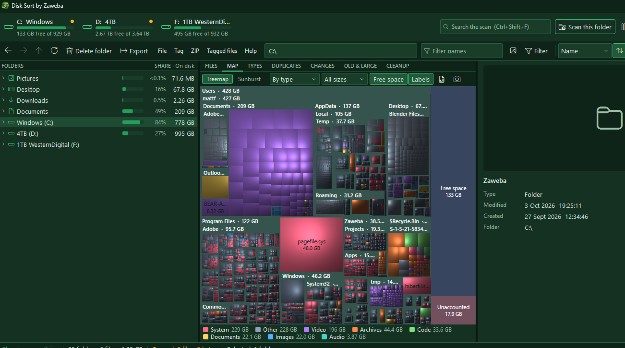
There is. Disk Sort by Zaweba has a Mac and Linux build that shares the same engine as the Windows version, so it measures and maps your files in the same way. On those systems it uses the Trash in place of the Recycle Bin, and the operating system's mount points in place of drive letters.
That matters if you use more than one kind of computer. You learn one tool and it does the same job on all of them, with the same tabs and the same careful approach to deleting.
What the shared engine gives you
Disk Sort scans a disk or a folder and adds a size layer to the folder tree, so each folder shows a bar, its share of its parent and its size. Click SHARE to sort biggest first and follow the largest folders down. The MAP tab draws every scanned folder as rectangles sized by space with cushion shading. Double-click or Enter zooms in and Backspace goes up a folder. V switches to a sunburst, where each ring is one folder level deeper.
Behind the map are the tabs that turn a picture into decisions. TYPES totals a folder by file type and extension. DUPLICATES finds identical files above a minimum size, with Confirm byte by byte to compare actual bytes after the hashes match. OLD & LARGE lists big files that have not changed in a chosen number of months. CHANGES compares the current scan with a snapshot saved after an earlier full scan, so you can see what grew.
On Windows the same app also sorts photos and files, with thumbnails, keepers and stars, tagging across folders and bulk rename. The Mac and Linux build shares that engine rather than being a separate program written from scratch.
What is different on a Mac or Linux
Drives on Windows have letters. On a Mac or Linux machine, disks appear at mount points instead, and Disk Sort shows those in their place. Deleting goes to the Trash rather than the Recycle Bin, with the same confirmation showing counts and a preview before anything moves.
A few things are tied to Windows. The fast scan reads the index of a local NTFS drive when running as administrator, which is a Windows feature, so on other systems the standard scan does the work. CLEANUP's pointers to Windows' own tools for Windows-managed places are also about Windows.
Getting a useful first scan
Start with your home folder rather than the whole system. It holds your documents, photos, downloads and caches, which are the things you can safely decide about. Scan it, open the MAP tab and look for the biggest blocks. Colour the map by type to see whether video, photos or something else dominates, or by age to spot large folders that have not been touched in years.
Then work through what you find with tags. Tag the files you want to move or remove, press G to see them all in one list, check it, and act. Moving to another disk copies, checks that everything arrived, and only then removes the original.
Free on every system
Disk Sort by Zaweba is free software under the Zaweba EULA, with no account and no sign-up. It works offline. The only network use is a once-a-day update check that downloads nothing, a weekly list of Zaweba apps, a ZIP download you ask for, and problem reports you choose to send.

