
Keeping several scans in memory in Disk Sort
Disk Sort by Zaweba can keep several scans in memory at once and uses the one that holds the open folder. Forget this scan frees the memory again.
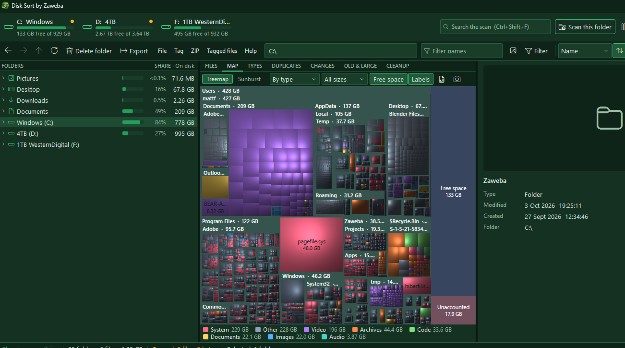
Nothing is thrown away in Disk Sort by Zaweba when you look at another drive after a scan. Several scans can be kept in memory at once, and the app shows each as "Scanned: kept in memory". Whichever scan contains the folder you've opened is used automatically, so moving between drives doesn't mean scanning again. When you've finished with one, Forget this scan frees the memory it was using.
Why keep more than one
Real tidying rarely happens on one drive. Photos move from the system drive to an external one. Old projects go from a laptop's drive to a backup disk. A family PC might have a small fast drive and a large slow one. Each side of those jobs needs its own scan, and you want both in view as you work.
With scans kept, you can open the full drive, see its size bars, then open the destination drive and see whether there's room, then go back, all without waiting.
How Disk Sort picks the scan
You don't choose a scan from a list. Open a folder in the tree, and Disk Sort uses the kept scan that contains it. Open a folder on drive D, and the D scan supplies the size bars, the map and the tabs. Go back to C, and the C scan takes over.
Scans can be of whole drives or of single folders, started from the drive strip or with Scan this folder (Ctrl+O).
Memory and when to forget
A scan holds information about every file and folder it covered. For a large drive full of small files that's a lot of entries, and it takes memory. On a PC with plenty, keeping several is no trouble. On a machine with less, or when Disk Sort shares the computer with something heavy, it's sensible to keep only what you need.
Forget this scan clears the scan for the open folder. The folder tree still works without it, since it doesn't need a scan to browse, and you can scan again whenever you like.
Good moments to forget a scan: after you've finished with a USB stick or memory card, after a one-off look at a network share, or when you're about to rescan a drive from scratch anyway.
Staying current
A kept scan is a picture of the drive at the time it was made. On an NTFS drive scanned as administrator, Disk Sort can keep up with changes as they happen. With the standard scan, refresh a folder with F5 or rescan everything with Ctrl+F5 after big changes.
Separately from the kept scans, Disk Sort saves a snapshot of folder totals after each full scan. That's what the CHANGES tab compares with next time, and what the map's By growth colouring uses. Forgetting a scan frees memory; it doesn't erase that history.
A typical session
Scan C from the drive strip. Find that Videos is huge. Scan the external drive too. Both are now kept. Open Videos on C, tag what should move, then use Move to with the external drive as the destination. Disk Sort copies, checks everything arrived, and only then removes the originals. Refresh both folders, and the size bars show the change on each drive. When you unplug the external drive, forget its scan.
It's a small feature, but it's what lets Disk Sort by Zaweba work across drives the way people actually tidy.

