
How do I see all the descendants of an ancestor?
In Family by Zaweba, select the ancestor and press Ctrl+3 for the descendants view, or print a descendant chart to PDF from Charts and reports.
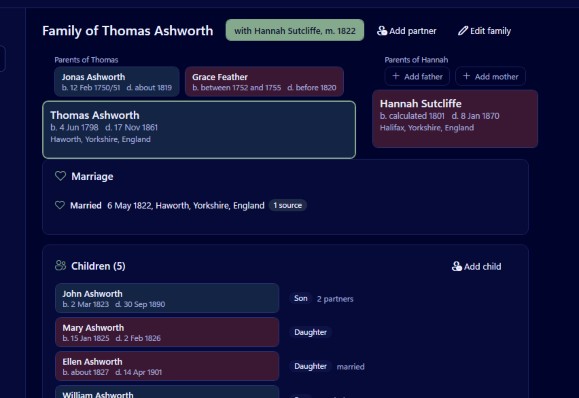
Select the ancestor in Family by Zaweba and press Ctrl+3, or choose View, Descendants. Their children, grandchildren and every later generation you have recorded are laid out below them. When you want it on paper, Charts and reports makes the same descendant chart as a PDF, either tiled across ordinary sheets or as one large sheet.
Before you start
You need the ancestor and their descendants in a tree. If your research is in another program, export a GEDCOM file there and import it into Family with File, Import GEDCOM (Ctrl+I). Family reads GEDCOM 5.5.1 and 7.0, and its import report lists anything it skipped, changed or kept, so you know the descendants all came across.
To find the ancestor quickly, use the people list's search (Ctrl+F). It matches any of a person's names, ignores accents, and can narrow by place or by a range of years, which helps when a name repeats in every generation.
On screen, step by step
Select the ancestor in the people list or click them in any chart. Press Ctrl+3. The descendants view opens with that person at the head.
Hold Ctrl and turn the mouse wheel to zoom. Zoom out first to see the whole spread, which branches are large, which stop, and how wide the chart has become. Zoom in to read names and dates.
Click anyone to recentre on them. That's the way to look at one branch on its own: click a grandchild and the view shows their descendants only. Alt+Left returns you to the ancestor.
Children from more than one partner
Families are rarely neat. Family records each child's relationship to each partner as birth, adopted, step or foster, and labels those clearly in its views. To check which children belong to which partnership, the family group view (Ctrl+1) gives each partnership its own tab and lists each partner's children from other relationships underneath.
On paper
Open Charts and reports and choose a descendant chart for the same person. You can tile it across A4, A3 or Letter sheets, with 12 mm shaded overlap strips, a dashed glue line, registration and trim marks, sheet labels and an assembly guide page. Or make it as one large sheet for a print shop, or fitted to A0 to A3.
The on screen descendants view uses the same layout as the printed chart, so what you saw is what the PDF will show. The dialog adds the chart's size, the number of sheets and the smallest text size, and warns if any text would print below 7 pt. Every box sits on a grid so sheet edges fall in the gaps and no box is ever cut in half. For a sense of scale, a 6 generation, 150 person descendant chart came to 28 A4 sheets.
When the chart looks incomplete
A descendants chart only shows people who are linked. If a child appears in the people list but not in the chart, they were added but never connected to their parents. Open the parents' family from the family group view and add the child as an existing person.
Duplicates can split a branch in two. If the same grandson was entered twice, once from a census and once from a marriage, half his descendants may hang from each copy. Tools, Find duplicates and merge finds likely pairs using name similarity, years and shared parents or birthplace, and its merge wizard combines them.
Dates can reveal wrong links. Tools, Check dates and relationships lists a child born after the mother's death, a parent younger than their child and similar problems, which often means a child is attached to the wrong family.
A written alternative
If a chart isn't what you need, Charts and reports also makes a family book to PDF, with one section per generation written as numbered sentences, portraits, step and adopted children marked, source notes and an index of names. For relatives who prefer reading to studying a wall chart, that is often the better gift.
Family is free software, runs offline and keeps each tree in one file on your own computer.

