
Can I add echo and reverb effects to a DJ mix?
Mix by Zaweba has echo, reverb, flanger and a filter sweep on each deck, timed in beats, with tails that ring out naturally when you switch them off.
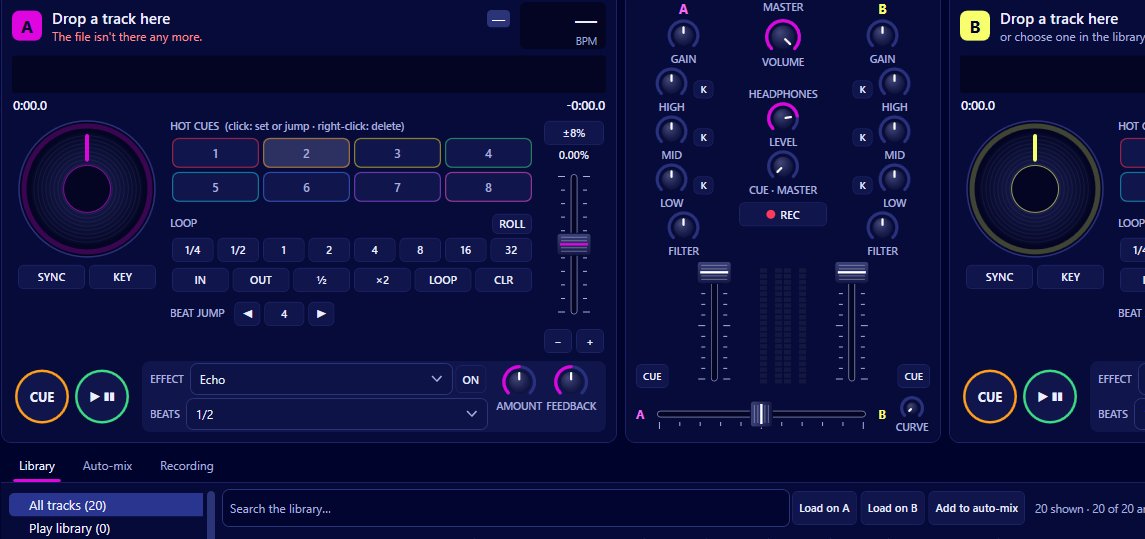
You can. Mix by Zaweba gives each deck its own echo, reverb, flanger and filter sweep, all timed in beats of that deck's tempo, from an eighth of a beat up to 16 beats. Each effect has an amount control that sets the dry and wet balance, plus a second control for feedback, brightness or depth. When you switch echo or reverb off, its tail rings out rather than cutting dead.
Because the timing follows the deck's tempo, an echo set to one beat stays on the beat even after you've nudged the tempo fader, and you don't need to work out milliseconds yourself.
The four effects
Echo repeats the sound at the beat length you choose. Short settings give a quick rhythmic doubling; longer ones leave space between repeats. The feedback control sets how many repeats you hear before they fade.
Reverb puts the deck in a space, from a small room feel to a long wash. Its second control shapes the brightness of the tail. It is the classic way to make a track feel like it's drifting away.
Flanger sweeps a comb filter through the sound in time with the beat, giving the jet plane whoosh. Depth sets how strong the sweep is.
The filter sweep moves a filter up or down over the beat length you set, which suits builds and slow transitions.
An echo out, from start to finish
An echo out is the most useful effect transition there is, because it gets you out of a track that has no clean ending. Line up the incoming track on the other deck with sync, and bring it in under the outgoing one. Near the end of a phrase on the outgoing track, set its echo to one or two beats, raise the amount, and switch it on. Then pull the outgoing channel fader down or cut it with the crossfader, and switch the echo off. The tail carries on for a few repeats and fades out under the new track.
Reverb works the same way for a softer exit, and the two can be used together for a longer trail.
Effects alongside the mixer
The channel mixer has its own tools that work well with effects. The one knob filter on each channel goes from low pass on the left to high pass on the right, and the three band EQ has a kill on each band. A favourite pairing is to sweep the filter to high pass while the echo is running, so the repeats thin out as they fade.
Watch the master meter while you experiment. Reverb and echo add level, and the limiter at -0.3 dBFS will show a limiting warning if you push too far. Lower the amount or the channel fader rather than relying on the limiter.
Using effects well
Less is usually more. An effect on every transition soon wears thin, so save them for moments that need help: a track with an awkward ending, a clash you need to hide, or the build into a big chorus. Short beat lengths sound busy; one or two beats tends to sit most naturally.
Effects also combine with loop rolls. Releasing a roll while the echo is on leaves a short trail behind the stutter, which is a tidy way to finish a build.
Recording effects in your set
Everything you hear on the master, effects included, goes into a recording made with Mix > Record the mix (Ctrl+R). So if you've worked out a nice echo out, it'll be there in the MP3 or WAV of your set, with the tracklist written alongside.
All of this is part of Mix by Zaweba, free software for Windows that plays the music files you already own.

