
Can I DJ offline, with no internet connection?
Yes. Mix by Zaweba runs entirely on your PC with the music files you own, with no account, no cloud and no telemetry, so it works with no connection.
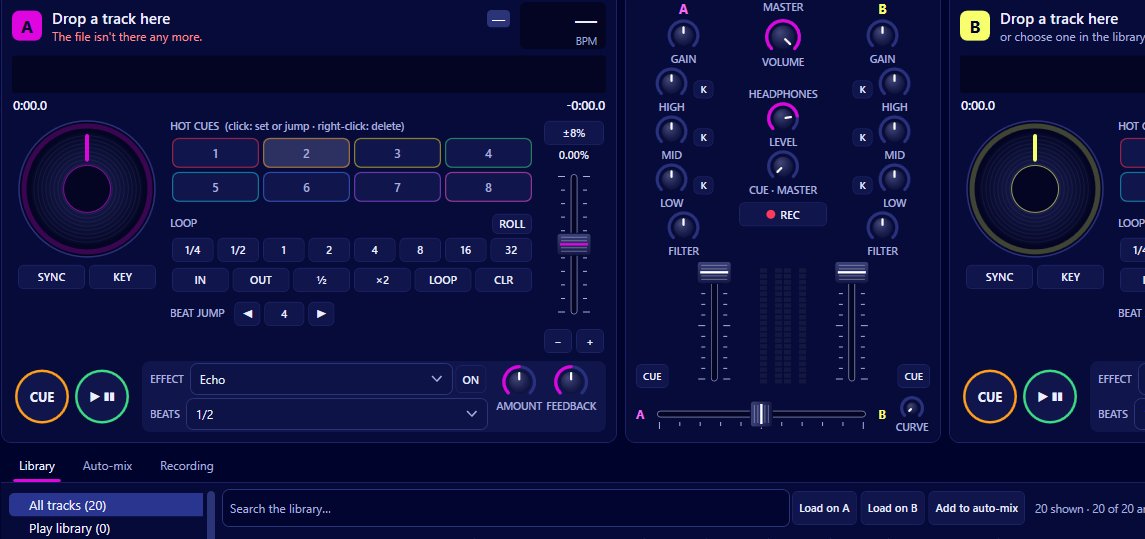
Yes, you can DJ fully offline with Mix by Zaweba. It runs entirely on your Windows PC and plays music files you already own, with no account to sign in to, no cloud and no telemetry. Once it's installed and your music is on the computer, nothing in a set needs an internet connection.
That matters more than people expect. Party venues, garden sheds, village halls and the back rooms of pubs are full of patchy wifi. If your DJ software depends on a connection, a dropped signal can end the music.
Why Mix is built this way
Mix only plays music you own as local files. Streaming services license DJ use separately, so Mix doesn't play them at all, and that removes the main reason a DJ program would need to go online in the first place. Your library comes from folders you add with File > Add a music folder or Add music files, and from Play by Zaweba's library when Play is installed (Mix reads it without changing it).
Everything clever happens on the computer too. Tempo, beat grid, key, energy, loudness and the waveform overview are all worked out by background analysis and cached locally. The What next suggestions, which explain their reasons in plain words, are worked out from that analysis and from what you've played before, on the machine.
Getting ready for an offline gig
The one thing to do in advance is let the analysis finish. Mix analyses in the background, but Library > Analyse everything now forces it, and Preferences can turn on analysing the whole library. With every track analysed, sync, beat grids, key chips, auto-gain and What next all work from the first track of the night.
Check your sound outputs at home. Preferences > Sound picks the main output for the speakers, the headphone output and the buffer, and there's an optional exclusive mode for the lowest latency.
Build your crates the night before. Crates are your own lists, and smart crates fill themselves by tempo range, Camelot keys, energy, genre and words, so you can have a warm up crate and a peak time crate ready.
Recording without a connection
Recording works offline as well. Mix > Record the mix (Ctrl+R) records the master to MP3 or 16-bit WAV, and writes a tracklist as a .txt and a .cue sheet next to it, into a recordings folder you can open from the File menu. You can share the recording later when you're back online.
What offline means for privacy
No account means no profile of what you play. Mix does keep a History view and remembers which tracks you've played after others, which is how What next learns, but that lives in the library database on your PC.
If the laptop is your whole rig
Without a controller, everything works with a mouse and keyboard; Help > Keyboard shortcuts (F1) lists the keys. With one, MIDI controllers connect through Windows MIDI, which doesn't need the internet either. And auto-mix can play a list hands free if you need to step away from the decks for a while.
Mix by Zaweba is free software, so the only things you need for an offline night are the laptop, your music and something to plug the speakers into.

