
Echo, reverb, flanger and filter sweep in Mix by Zaweba
The deck effects in Mix by Zaweba are timed in beats from 1/8 to 16, with tails that ring out. Here is how to use each one in a DJ set.
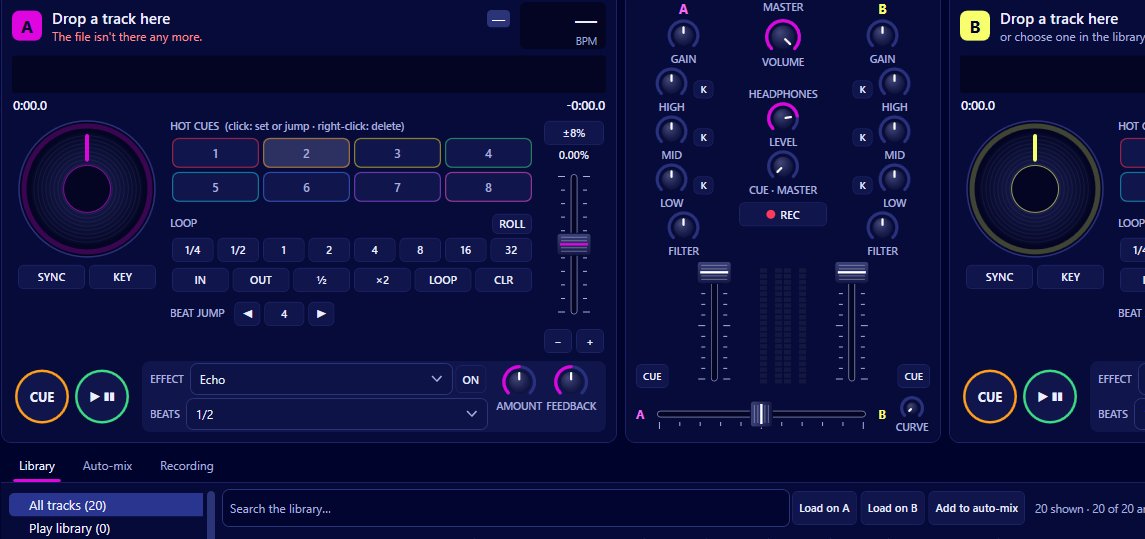
Echo, reverb, flanger and a filter sweep are built into every deck of Mix by Zaweba, and they are timed in beats of that deck's tempo rather than in milliseconds. Pick a timing from 1/8 of a beat up to 16 beats, set the amount of dry and wet, and adjust the second control (feedback, brightness or depth, depending on the effect). Because the timing follows the deck, an echo stays in time even after you move the tempo fader or sync.
Used sparingly, effects make a blend smoother and a set more interesting. Here's what each one is good for.
Each effect has a beat timing, an amount, and one more control that shapes it. The amount sets the balance between the dry track and the effect. The beat timing sets how fast the effect moves or repeats. The third control changes its character: how many times an echo repeats, how bright a reverb is, or how deep a flanger sweeps.
When you switch echo or reverb off, their tails ring out rather than stopping dead. That small detail is what lets you use them for transitions.
Echo
Echo repeats the sound in time with the beat. At 1/2 or 1 beat it doubles up a vocal or a snare in a way that feels part of the track; at longer timings it throws phrases into the gaps.
The classic use is the echo out. Near the end of a track, turn the echo on, raise the amount, then pull the channel fader down or switch the effect off at the end of a phrase. The echoes keep repeating after the music has gone, and the next track comes in under them.
Reverb
Reverb adds space, as if the track were playing in a bigger room. A little on a sparse intro makes it feel wider. A lot, held for a bar and then switched off, washes a track away at the end of a section, and the tail rings out while the next track takes over.
The brightness control keeps reverb from getting muddy. A darker reverb sits behind the music; a brighter one stands out.
Flanger
Flanger is a sweeping, jet-plane whoosh. Timed in beats, it rises and falls in step with the music. Set a long timing, say 8 or 16 beats, and it slowly builds over a phrase, which works well on a breakdown before the drums come back. Depth sets how strong the sweep is.
It's the most noticeable of the four, so keep it for moments rather than leaving it on.
Filter sweep
The filter sweep moves a filter up and down in time with the beat, giving a rhythmic opening and closing of the sound. It's different from the one-knob filter on each mixer channel, which you set by hand; the sweep moves by itself. Use it to add movement to a loop you're holding while you line up the next track.
Effects in a blend
The cleanest transitions often combine an effect with the mixer. Hold the outgoing track in a short loop, add a filter sweep, bring the new track in with its bass cut on the EQ, then echo the old one out on the last beat of a phrase. The tail carries over while the new track takes the lead.
Keeping effects musical
Choose timings that match the music. Whole beats and bars sound natural; 1/8 and 1/4 beat timings are best for short bursts.
Turn effects off at the end of a phrase rather than in the middle. Phrases are usually 8, 16 or 32 beats, and the scrolling waveforms show the bar lines.
Watch the master. Effect tails add level, so a long reverb on top of a full blend can push the master into its limiter.
And if you record your set with Ctrl+R, the effects go into the recording, because the master is what is recorded. Practise a couple of transitions before you rely on them in a mix you plan to keep.

