
How to jump forward by beats in a track while DJing
Beat jump in Mix by Zaweba moves a playing track on by 1 to 32 beats and keeps it in time, so you can skip a section without losing the beat.
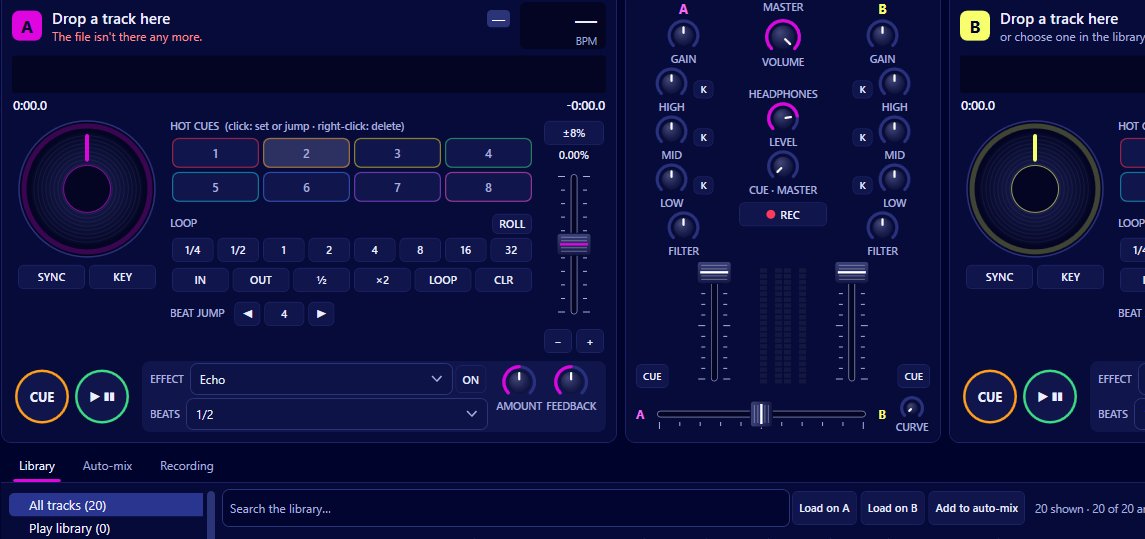
Beat jump is the tool for it in Mix by Zaweba. It moves the playhead by a set number of beats, anywhere from 1 to 32. Because the jump is a whole number of beats, the track lands back in time with itself and with the other deck, so you can skip a long breakdown or repeat a section without anyone hearing a stumble.
Beat jump sits with the loop controls on each deck, alongside auto loops and loop roll. The jump size is something you choose, and the one you'll use most is the length of a musical phrase.
Choosing a jump size
Most dance tracks are built in phrases of 8, 16 or 32 beats. A 32 beat jump skips eight bars, which is often a whole section, and a 16 beat jump skips half of one. Jumping by 1, 2 or 4 beats is more for fixing things: if you dropped a track a beat early and the phrases don't line up, a short jump puts it right.
Watch the scrolling waveform above the decks while you choose. It shows beat lines and brighter bar lines, so you can see where the next section starts and how far away it is.
Making a jump
Load the track and let it play. Pick the jump size you want, then press beat jump at a moment when the jump will land somewhere useful, such as the start of a bar. The track carries on from the new position at the same tempo.
Keep quantize on, as it is by default. It snaps cues and loops to the beat grid, so actions you take land on the grid even if your timing is slightly off. You'll find it in the Decks menu as Quantize cues and loops to the beat.
If the track is synced to the other deck, sync keeps the beats phase locked while it's on, so after a jump the two tracks stay together.
When beat jump helps
Skipping a long intro or breakdown is the obvious use. If a track spends a long time on an ambient section before the beat returns, a jump takes you past it while the other deck holds the floor.
It also helps line up phrases in a blend. If you bring a track in and realise its chorus will arrive four beats after the outgoing track's, a 4 beat jump fixes it on the spot.
Beat jump pairs well with loops too. Set a loop to hold a groove, then jump on through the track when you exit to land on a different part.
Beat jump, hot cues and the overview
There are other ways to move round a track in Mix, and each suits a different job. Hot cues (eight per track, saved in the library) take you to exact points you've marked in advance, with keys 1 to 8 on the keyboard. Clicking the overview waveform on a deck jumps straight to that place, but not on the beat, so it's better while preparing than during a mix. Beat jump is the one to reach for when the track is live and you need to move without losing time.
From the controller
If you use a MIDI controller, the mapping editor in MIDI > Controllers and mappings covers loop and jump values, so you can put beat jump sizes on pads or buttons with learn mode.
Mix by Zaweba is free DJ software for Windows that works with your own music files. Once beat jump is in your hands, you'll find yourself reshaping tracks on the fly.

