
Master volume, meter and limiter in Mix by Zaweba
The master section of Mix by Zaweba: a volume control, a stereo meter and a limiter at -0.3 dBFS that warns you when it is working.
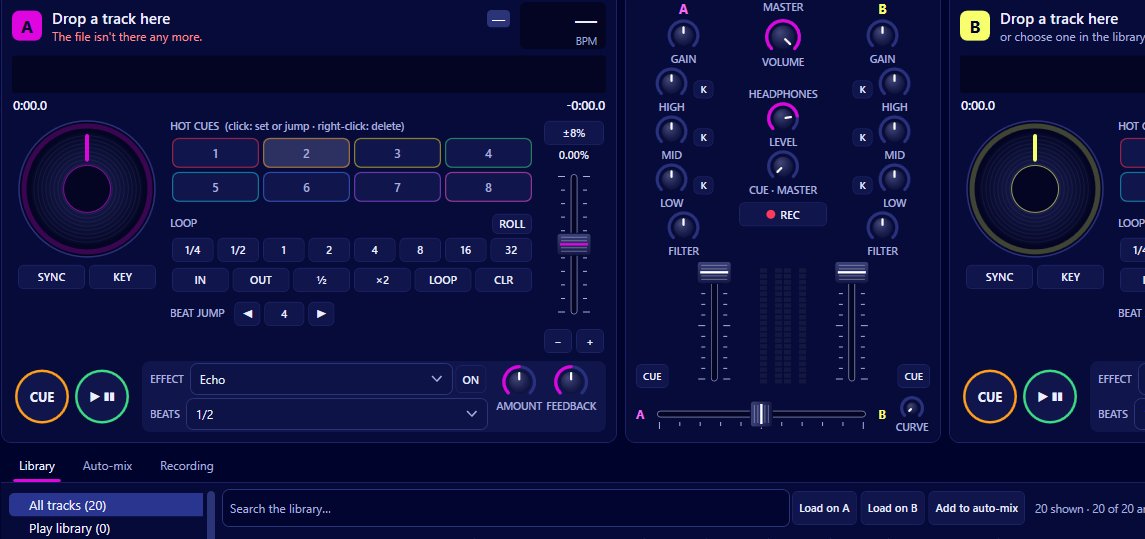
At the end of the signal chain in Mix by Zaweba, after both channels and the crossfader, sits the master section: a master volume, a stereo meter and a limiter set at -0.3 dBFS. When the limiter is working it shows a 'limiting' warning. Together they control how loud the whole mix leaves the program, whether that's going to your speakers or into a recording of your set.
It's not the most exciting part of a DJ mixer, but it's the one that decides whether your mix sounds clean or crunchy.
What each part does
The master volume sets the overall level. The channel faders and the crossfader decide the balance between the decks; the master decides how loud the result is.
The stereo meter shows that level, left and right. Watch it during blends, because two tracks playing at once are louder than one.
The limiter is a safety catch. Whatever reaches it, nothing leaves above -0.3 dBFS, just under the top of digital audio. That stops hard clipping, the harsh distortion you get when a signal goes over the top.
Reading the limiting warning
If the warning is lit, the mix is reaching the limiter and being held down. A brief flash on the biggest kick in a blend is nothing to worry about. A warning that stays on means you're relying on the limiter to hold the mix together, and that tends to sound flat and squashed, with drums losing their punch.
When it stays lit, turn something down. The master is the obvious choice, but it's often better to find the cause.
Finding where the level comes from
Blends are the usual culprit. Two full tracks at full channel volume add up. Use the EQ to swap the bass rather than running both bass lines together; it cuts the level and sounds cleaner. Mix's auto-mix does exactly that, swapping the bass half-way through a blend.
Gain is the next place to look. Each channel has gain of plus or minus 12 dB on top of auto-gain. If you've pushed a quiet track up, it may now be louder than the rest.
Effects can add level too. Echo and reverb tails stack on top of the music, and a deep EQ boost of up to +6 dB on a band raises the level of that channel.
Levels and auto-gain
Auto-gain brings every track to the same loudness (EBU R128, a default target of -12 LUFS), so tracks mastered at very different levels come out evenly. That takes much of the work out of keeping the master steady from one song to the next. It's switched on by default and its target is set in Preferences > Mixing. With auto-gain on, most mixes sit comfortably under the limiter with the channel gains near the middle.
The master and recording your set
When you record with Mix > Record the mix (Ctrl+R), it's the master that gets recorded, to MP3 or 16-bit WAV. So everything above applies directly to your recording. A mix that's hitting the limiter all evening will sound that way in the file. Do a short test recording before a set and listen back.
The master in Mix is the level leaving your computer. If you play through an amplifier or powered speakers, keep the master in a healthy range and turn the room up on the amplifier rather than pushing Mix's master to the top. You'll keep the limiter quiet and the sound clean.
A simple habit
Set up the first track so the meter sits comfortably below the top with the limiter warning off. Then mix with the channel faders, EQ and crossfader, and leave the master alone unless the room needs it louder or quieter. If the warning starts to come on regularly, that's your cue to tidy the blends, not to reach for the master.

