
Quantize in Mix by Zaweba: cues and loops on the beat
Quantize in Mix by Zaweba snaps cues and loops to the beat grid, so they land in time even if your click is a little early or late.
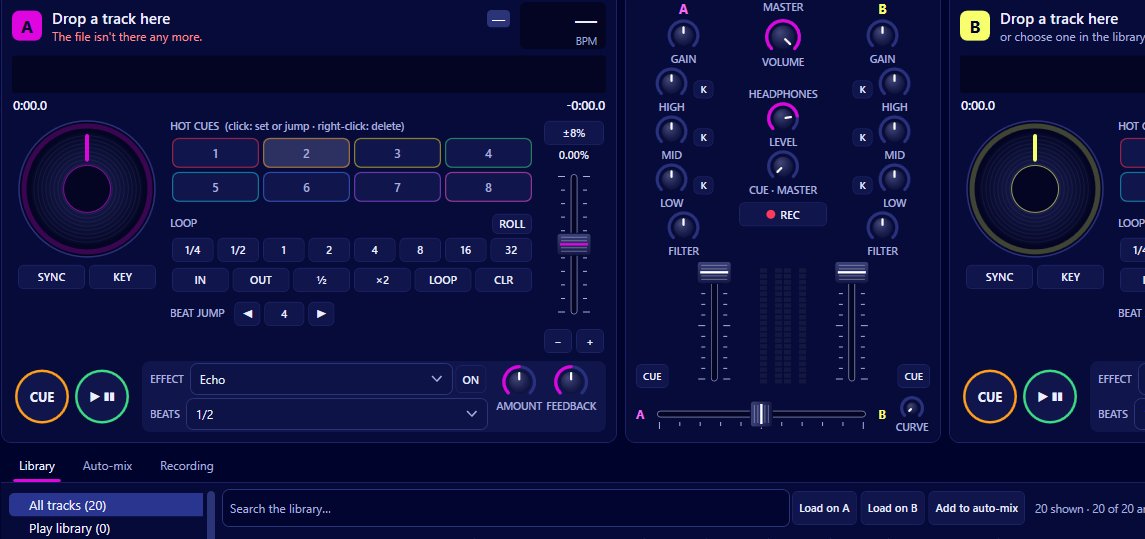
Pressing a button exactly on the beat is harder than it sounds, especially in the middle of a busy blend. Quantize in Mix by Zaweba takes care of it. With quantize on, cues and loops snap to the beat grid, so a hot cue you set slightly late still sits on the beat, and a loop you start a moment early still begins on it. It's on by default, and you can find it under Decks > Quantize cues and loops to the beat or in Preferences > Mixing.
What the beat grid is
When Mix analyses a track in the background, it works out the tempo and a beat grid: where every beat falls through the song. You can see that grid on the scrolling waveforms above the decks as beat lines, with brighter lines on each bar.
Quantize uses those lines. Whatever you do with cues and loops is moved onto the nearest beat.
What gets snapped
Hot cues. Click an empty hot cue button (or press 1 to 8) and the cue is set on the nearest beat rather than at the exact moment of your click. Jumping to it later lands on the beat as well.
The main cue point. Setting the cue on a stopped deck snaps it to the grid.
Loops. Auto-loops from 1/4 to 32 beats, manual loop in and out, halving and doubling all line up with the beats. A loop that starts and ends on beats repeats seamlessly, without the hiccup you get from a loop a few milliseconds too long or short.
Why it matters
Timing errors build up. If a hot cue is 30 milliseconds late, every time you jump to it the new section starts out of step. If a loop is a fraction too long, the groove stumbles on each repeat. Quantize removes those errors at the source.
It also lets you concentrate. You don't need to stare at the waveform and time each press precisely; you only need to be roughly right and Mix does the rest. That is a large part of why the hot cues, loops, loop roll and beat jump in Mix stay musical even when you're learning.
When the grid is wrong
Quantize assumes the beat grid is right. Most tracks with a steady beat analyse cleanly, but a live recording with a drifting tempo, or a track with a long beatless intro, can end up with a grid that doesn't quite match what you hear. On those, snapping can move your cue to the wrong place.
If a cue keeps landing just off what you hear, switch quantize off from the Decks menu, set the cue by ear, and switch it back on afterwards. You can also leave it off if you like setting cues at an exact moment, such as the start of a vocal that falls between beats.
Quantize with sync
Sync keeps two decks' beats phase-locked, and quantize keeps your cues and loops on those beats. Together they mean that jumping to a hot cue on a synced deck lands in time with the other deck. That's what makes it possible to cut between hot cues during a blend without the mix falling apart.
Setting it once
Because quantize is on by default, most people never need to touch it. If you change it, the setting is in two places, the Decks menu for a quick toggle and Preferences > Mixing alongside the other mixing defaults like key lock on every load, the tempo fader range and auto-gain. Choose it once there and it carries across every session.

