
What is a loop roll, and how does it work in a DJ mix?
A loop roll repeats a short slice of a track while you hold it, then lets the track carry on as if it never stopped. Here is how it works in Mix by Zaweba.
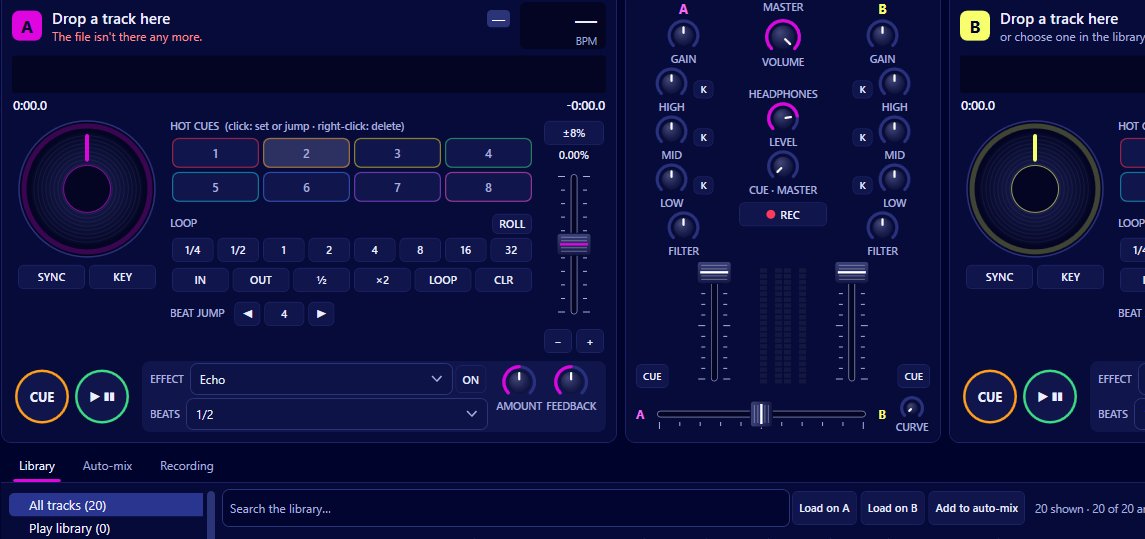
A loop roll is a loop that only lasts as long as you hold it down. While it is held, a short slice of the track repeats over and over; when you let go, the track picks up at the point it would have reached anyway, as though it had kept playing underneath. In Mix by Zaweba this is the ROLL mode on the loop controls, and it works with any loop length the app offers.
That last part is what makes a roll different from an ordinary loop. With a normal loop, the track stays inside the loop until you exit, and the song is then later than it was before you started. With a roll, nothing is lost. The phrase you were in still ends on time, so the next drop or vocal comes in exactly where the dancers expect it.
Why DJs use them
Rolls are a quick way to add tension. Hold a one beat roll in the last bar before a chorus and the stutter builds anticipation, then release on the downbeat and the track lands as normal. Very short rolls give a buzzing, machine gun effect; longer ones repeat a whole phrase of a vocal or a riff for a moment of emphasis.
Because the track position keeps moving while you hold, a roll is also forgiving. If you hold it a little too long, you haven't pushed the track out of time with the other deck, and the phrase structure of your mix stays intact. That makes it a friendlier tool than a normal loop for someone still learning to count bars.
Doing a roll in Mix
Mix has auto loops from a quarter of a beat up to 32 beats, as well as loop in and loop out, halve, double and exit or reloop. Switch the loop section into ROLL mode and the same loop sizes become rolls: press and hold one, and the deck repeats that many beats until you release it, then carries on where the track would have been.
Quantize matters here. It snaps cues and loops to the beat grid, and it is on by default (you'll find it in the Decks menu as Quantize cues and loops to the beat, and on the Mixing page of Preferences). With it on, a roll starts on the beat even if your press is a fraction early or late, so the repeat sounds musical rather than ragged. Leave it on unless you are deliberately after something messier.
The beat grid that quantize uses comes from the background analysis Mix does on every track, which works out tempo and beat positions and caches them. Loops and rolls therefore line up properly from the first time you play a track, as long as it has been analysed.
If you use a MIDI controller, the mapping editor (MIDI > Controllers and mappings) covers pads and loop values, so you can put rolls on pads if your controller has them and your mapping is set up that way.
Getting rolls to sound good
Start short and stay near the end of a phrase. A roll in the middle of a verse rarely helps, but the last beat or two before a change gives the ear something to expect. Try halving the length as you go, from one beat to half a beat to a quarter, for a classic build.
Combine a roll with the deck effects for more colour. Mix has echo, reverb, flanger and a filter sweep on each deck, timed in beats of the deck's tempo, and echo and reverb tails ring out after you switch them off. Releasing a roll while an echo is running leaves a short trail behind it rather than an abrupt stop.
Watch the scrolling waveform above the decks while you practise. It shows beat lines and brighter bar lines, so you can see where the bar ends and time your release for the downbeat.
Rolls, loops and beat jump
Mix also has beat jump, which moves the playhead by 1 to 32 beats. Together these three tools cover most of what you'd want to do with the structure of a track: a loop holds a section for as long as you need (handy for extending an intro while you line up the next record), beat jump skips a section you don't want, and a roll decorates the track without changing where it is.
Used sparingly, a roll is one of the easiest ways to make a mix sound played rather than just pressed. The fact that the track carries on underneath means you can try it without much risk, which makes it a good first trick to learn.

