
Why Mix by Zaweba works offline with no account
Mix by Zaweba plays the music files you own, on your computer, with no account, no cloud and no telemetry. Here is what that means at a gig.
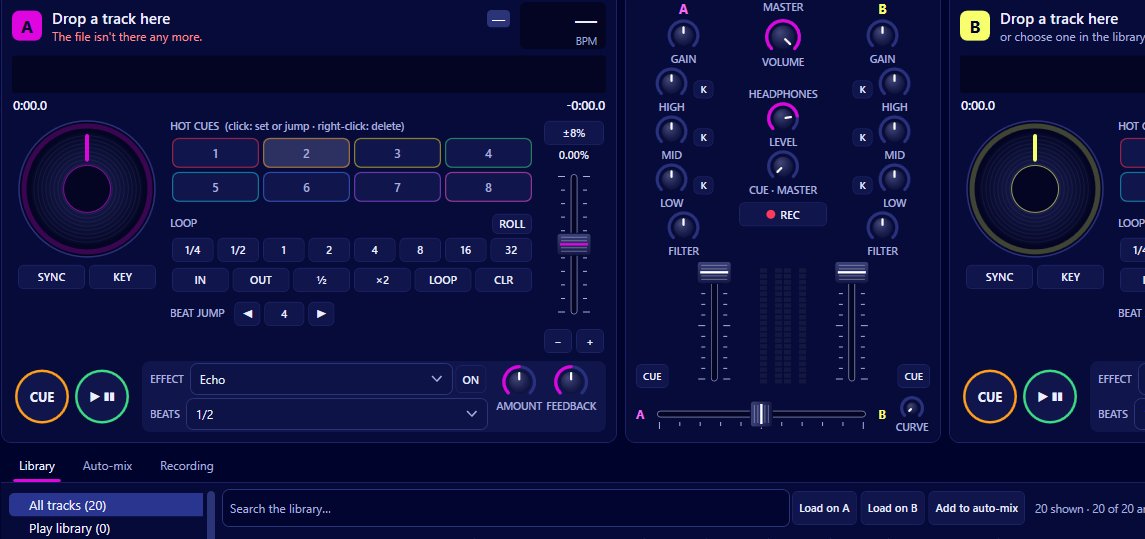
Internet at a party venue is rarely something to count on, and Mix by Zaweba never asks for it. It plays music files you already own on your computer, with no account to sign into, no cloud and no telemetry. Everything from track analysis to recording your set happens on your own machine.
That's a design decision with practical consequences, most of them good. Here's how it plays out.
Nothing between you and the decks
There's no sign-in screen. Open Mix and the decks are ready. That matters when you're setting up in a hurry, or when the laptop has been asleep in a bag and the venue's Wi-Fi password is on a scrap of paper behind the bar.
Nothing streams, so nothing buffers. A track loads from your drive and starts playing while it's still loading. No signal drop can stop the music.
Your library stays on your computer
The library comes from Play by Zaweba's library (read only, when Play is installed) and folders you add yourself. Tags are read from your files, and the analysis of tempo, beat grid, key, energy and loudness is worked out on your computer and cached there.
Hot cues are saved in the library database on your machine. Crates, smart crates and the History view live there too. Nothing is uploaded or synced anywhere.
When you record your set to MP3 or WAV, the file is written to a recordings folder on your computer, opened from the File menu, along with the .txt tracklist and the .cue sheet. What you do with it after that is up to you.
Why only your own files
Mix plays local files and doesn't support streaming services. Streaming services license DJ use separately, so Mix sticks to music you own. In practice that means buying or ripping the tracks you want to play and keeping them in a folder Mix watches.
Getting ready for a gig offline
Because nothing is fetched at the last minute, preparation is about your files. Add any new tracks to a watched folder, then use Library > Analyse everything now so every track has its grid, key and loudness ready. Build crates for the night and set hot cues on the tracks you'll lean on.
Copy the music folder to a backup drive. If the laptop fails, you can be up and running on another computer with Mix installed by pointing it at the backup.
Check Preferences > Sound with the equipment you'll actually use, and do a short test recording to make sure levels are healthy.
Privacy and peace of mind
No telemetry means Mix doesn't send anything about what you play or how you use it. Your history, your crates and your recordings are yours.
It also means Mix can't be changed under you by a service update in the middle of a busy week. It works the way it worked yesterday.
The trade-offs
Backups are your job, since nothing is kept in a cloud. A big library on a laptop takes disk space. And you can't play a track you don't have, so a guest's request for something you don't own will have to wait.
For most home DJs and anyone doing the music at a party or small gig, those are easy trade-offs for a mixer that works anywhere, with or without a signal. Mix is free software, so there's nothing to subscribe to either.

