
Can you put a clock and calendar on your desktop wallpaper?
Yes. Scene by Zaweba has clock, date and calendar widgets that work in any skin, from analogue to digital, with a 24-hour option in Settings.
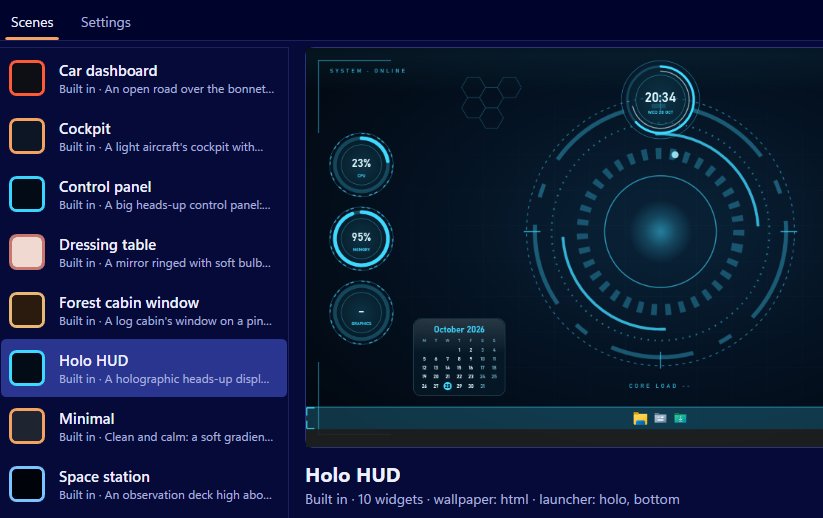
Clock, date and calendar widgets come with Scene by Zaweba, and they sit on your desktop in front of the wallpaper and behind your windows. They show local time, work in every skin Scene has, analogue and digital included, and there's a 24-hour clock option in Settings.
Windows puts a small clock in the corner of the taskbar. That's fine for a check, but a big, well-styled clock on the desktop is easier to read from across a room and makes a desktop feel finished.
The quickest way
The Minimal scene is built around a big clock. It shows a gradient that follows the time of day, the clock, the date and the weather, and it doesn't animate at all, so it's light on your PC. Switch it on from the Scenes tab with Switch on or off, or press Ctrl+Space, and you have a clock and date on your desktop straight away.
Other built-in scenes include time too, styled to suit them, whether that's a dashboard, a cockpit or a wooden desk.
Adding clock, date and calendar to any scene
For a scene of your own, add the widgets in the editor and set each one's skin, caption, size, anchor and offsets, and which monitor it sits on. You can also add them in Arrange mode, right on the desktop, using Add widget on the floating bar. Drag them into place, size them with the corner grip and press Done. They snap to a 10 pixel grid and to each other's edges, which makes it easy to line a calendar up under a clock.
Built-in scenes are read-only. Arranging one saves a copy with "(my layout)" in its name, and Scene > Duplicate gives you an editable copy for the editor.
Picking a skin
Every widget kind works in every skin, so the choice is about taste. Analogue suits a wooden desk or a dressing table. Digital suits Minimal or a dark scene. Dial and ring skins look at home in Cockpit or Car dashboard. The HUD skin, with cut corners, brackets and tick marks, fits Holo HUD and Space station. Paper and plaque skins are good for a calendar on a warm, textured wallpaper.
Widgets take the scene's palette and can have a highlight colour. If none of the skins is quite right, a widget can use an SVG or PNG face image, so you can draw your own clock face.
12 or 24 hours
Open Settings from the View menu or with Ctrl+, and tick the 24-hour clock option if that's how you read time. It applies across Scene, so every clock in every scene follows it.
Making them easy to read
A clock is something you read from a distance and without thinking. Make it bigger than you first expect, and put it where your eyes rest when the screen is idle, often the top or centre of the main monitor. A calendar needs less size but more contrast, especially over a moving wallpaper, so a solid skin often beats a thin one.
The clock, date and calendar widgets are native windows rather than web pages. They're cheap to run, positioned exactly and keep updating even while the wallpaper behind them is paused for a full-screen game or because you're on battery.

